
If you have a business idea that needs software behind it — a booking system, a client portal, a niche tool your industry is missing — the old advice was simple: learn to code or hire someone who can, and budget months and thousands of dollars before you even know if customers want it. That advice is outdated.
No-code SaaS platforms now let founders, freelancers, and small teams design, launch, and run real software products using visual builders instead of programming languages. This guide walks through what no-code SaaS actually means, which platforms are worth your time in 2026, how to build your first product step by step, and where no-code genuinely falls short — so you can make an informed decision instead of a hopeful guess.
What Is a No-Code SaaS Platform?
A no-code SaaS platform is a cloud-based tool that lets you build and run a software-as-a-service product — one with user accounts, a database, payments, and workflows — through visual, drag-and-drop interfaces instead of writing code. You design screens, connect data, and define logic (‘when a user does X, do Y’) using pre-built blocks, and the platform handles the underlying infrastructure: hosting, servers, and security.
In practice, this means a non-technical founder can launch a working product — a booking tool, a membership site, a client dashboard — in weeks rather than months, and iterate on it directly without waiting on a developer’s schedule.
Why Businesses Are Choosing No-Code SaaS in 2026
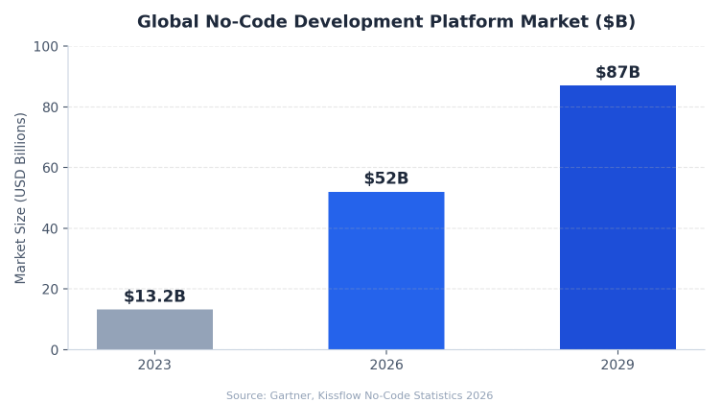
No-code adoption isn’t a fringe trend anymore. The global no-code development platform market is projected to reach roughly $52 billion in 2026, up from about $13.2 billion in 2023, and is on track to approach $87 billion by 2029.
A few forces are driving this shift:
- The developer shortage is real. Analysts estimate a global shortfall of several million software developers, which pushes non-technical teams toward citizen development.
- Gartner projects that by 2026, roughly 80% of technology products will involve non-technical builders in some part of the process.
- No-code cuts typical build time by around half compared to custom development, letting founders test ideas with real users faster.
- Cloud infrastructure has matured, so even multi-user, multitenant SaaS products can now be hosted reliably without an in-house DevOps team.
How No-Code SaaS Works: The Core Components
Every no-code SaaS product, regardless of platform, is built from the same four building blocks.
1. Visual Interface Builder
A canvas where you place buttons, forms, tables, and pages by dragging elements, similar to using a design tool like Canva or Figma, except the output is a live, functioning application.
2. Database Layer
A built-in or connected database (often Airtable, Google Sheets, or a native database) that stores user data, orders, content, or whatever your product manages.
3. Workflow and Logic Engine
Visual ‘if this, then that’ logic that replaces code: when a user signs up, send a welcome email; when a payment succeeds, unlock a feature. This is where most of the real product thinking happens.
4. Integrations and APIs
Connections to Stripe for payments, email tools for notifications, and other apps via native integrations or API calls, so the product can talk to the rest of your business stack.
Best No-Code SaaS Platforms to Consider
There is no single ‘best’ platform — the right one depends on what you’re building. Here’s a practical comparison of the tools most founders evaluate first:
| Platform | Best For | Learning Curve | Starting Price |
|---|---|---|---|
| Bubble | Full web SaaS apps with complex logic | Moderate–Steep | Free tier; paid plans from ~$32/mo |
| Softr | Turning Airtable/Google Sheets data into client portals | Easy | Free tier; paid plans from ~$59/mo |
| Glide | Mobile-first internal tools and lightweight apps | Easy | Free tier; paid plans from ~$25/mo |
| Adalo | Native mobile apps with app-store delivery | Easy–Moderate | Free tier; paid plans from ~$45/mo |
| Knack | Database-driven business apps and portals | Moderate | Free tier; paid plans from ~$59/mo |
A useful rule of thumb: if your product is workflow-heavy with complex user logic, prioritize the platform’s automation engine over how the interface looks in a demo. A tool that looks polished but can’t handle your actual business rules will cost you more time in workarounds than it saved in setup.
Not sure which no-code platform fits your idea?
If you'd rather get a second opinion before committing weeks to the wrong tool, I help founders plan and set up no-code SaaS and Shopify projects. Get in touch on Upwork or check out my Fiverr gigs to talk through your project.
Step-by-Step: How to Build Your Own No-Code SaaS Product
Step 1: Validate the Problem Before You Build Anything
Talk to 10–15 potential users about the specific problem you want to solve. If you can’t find people actively working around this problem today (spreadsheets, manual processes, a clunky competitor), the product doesn’t have a validated need yet.
Step 2: Map Your Core User Flow
Sketch the three or four screens a user absolutely needs: sign-up, the main dashboard, the core action (booking, uploading, ordering), and confirmation. Resist adding features at this stage.
Step 3: Choose Your Platform Based on Your Build Type
Web-first SaaS with complex logic points toward Bubble; a data-driven client portal points toward Softr or Knack; a mobile-first tool points toward Glide or Adalo.
Step 4: Build the Database Before the Interface
Define what data you’re storing and how it relates (users, orders, bookings) before designing screens. Interfaces are easy to change; a poorly planned data structure is expensive to fix later.
Step 5: Connect Payments and Test With Real Transactions
Integrate Stripe or a similar processor early and run a real test transaction, not just a sandbox one, before inviting your first paying customer.
Step 6: Launch to a Small Group First
Release to 10–20 real users before a public launch. No-code tools make it fast to fix what breaks, but you still need real usage to find what’s broken.
No-Code vs Low-Code vs Traditional Development
These three approaches are often confused. Here’s how they actually compare:
| Factor | No-Code | Low-Code | Traditional Development |
|---|---|---|---|
| Coding required | None | Minimal (some scripting) | Full-stack coding |
| Typical build time (MVP) | Days to a few weeks | Few weeks | Several months |
| Upfront cost | Low | Moderate | High |
| Customization ceiling | Moderate | High | Unlimited |
| Best fit | MVPs, internal tools, micro-SaaS | Growing teams needing flexibility | Complex, high-scale enterprise products |
If your product will eventually need deep customization, heavy scale, or enterprise compliance (SSO, audit logs, data residency), plan for a possible migration path from no-code to custom development later, rather than assuming one tool will carry you forever.
Common No-Code SaaS Challenges — and How to Handle Them
“Will it scale if my product grows?”
Most modern no-code platforms run on standard cloud infrastructure and can handle real user loads. The more relevant question is cost: some platforms charge based on workflow runs or database records, so costs can rise faster than expected at scale. Check the pricing model against your expected usage before committing.
“Am I locked into one vendor?”
Yes, to a meaningful degree — you can’t simply export a Bubble app into raw code. Reduce this risk by keeping your data exportable (CSV, API access) and documenting your workflows outside the platform, so a future migration is a data transfer rather than a rebuild.
“Is it secure enough for real customers?”
Established platforms handle hosting security, but application-level security (who can see what data, role permissions) is still your responsibility to configure correctly. Don’t assume default settings are enterprise-safe.
Real-World No-Code SaaS Examples
No-code isn’t limited to side projects. Comet, a French marketplace connecting companies with vetted tech freelancers, was built entirely on Bubble by a non-technical founder and scaled to roughly €800,000 in monthly recurring revenue, later raising €14 million in funding — a concrete proof point that no-code can support a fully operational SaaS business, not just a prototype.
Smaller, more common examples include niche booking platforms for local service businesses, membership communities built on Softr, and internal operations tools that replace error-prone spreadsheets — all launched without a development team.
Have a no-code SaaS idea but need it found on Google?
Building the product is half the work — getting it discovered by real customers is the other half. As an SEO strategist and content marketer, I help SaaS founders set up their site structure, content, and search visibility from day one. View my SEO & content marketing profile on Upwork to discuss your launch plan.
Related Reading
If you’re weighing whether to build with no-code or hire outside help, it’s worth first understanding how much SEO costs for a new product launch, since visibility budget should be planned alongside your build budget. If your SaaS idea includes an e-commerce component, our guide on rebuilding a Shopify store covers the same build-vs-hire questions from a store-specific angle.
Frequently Asked Questions
Yes — modern no-code platforms power real, revenue-generating businesses, not just prototypes. Companies have scaled to seven figures in annual revenue on tools like Bubble. The right fit depends on your complexity needs: simple to moderately complex products are well within no-code’s range, while highly specialized enterprise software may eventually need custom code.
Most no-code platforms offer a free tier for testing, with paid plans typically starting between $25 and $60 per month as your user base grows. This is dramatically lower than custom development, which often starts in the tens of thousands of dollars for a comparable MVP.
No formal coding is required, but logical thinking helps. You’ll need to understand basic concepts like databases (what information you’re storing) and workflows (what happens when a user takes an action). Most platforms have a learning curve of one to three weeks for a functional first build.
No-code requires zero programming and is built entirely through visual interfaces, aimed at non-technical users. Low-code still uses visual tools for most of the work but allows developers to add custom code snippets for advanced functionality, making it better suited for technical teams that want speed without giving up flexibility.
Yes, but with caveats. You can migrate your data, user base, and business logic to a custom-built product later, but the no-code build itself typically can’t be directly converted into source code. Many founders treat no-code as a validation stage, then rebuild in code once product-market fit is proven and it makes financial sense.