

If your SaaS product is growing or you’re planning one from scratch, the architecture decisions you make today will determine how far you can scale tomorrow. You’ve got a SaaS idea. Maybe you’ve already started building. But there’s a question that’s nagging you: Am I setting this up the right way?
It’s a fair concern. Bad architecture at the start of a SaaS project doesn’t just slow you down — it can make scaling practically impossible without rebuilding everything from scratch. And that’s a painful, expensive mistake that hundreds of startups make every year.
In this guide, you’ll get a clear, practical breakdown of how SaaS website architecture actually works from the frontend users see, to the data layer powering everything underneath. We’ll cover the tech stack choices that matter, how multi-tenancy affects your design, what a good API structure looks like, and the performance and security principles that serious SaaS products are built on.
Whether you’re a founder trying to communicate with your dev team, a developer building your first SaaS product, or a business evaluating a rebuild, this guide gives you a solid foundation.
For Learn About: How Much Does SaaS Development Cost, Click Here!
Need a SaaS Architecture Expert?
From initial planning to full-stack development, we help startups and growing businesses build scalable, production-ready SaaS products.
$908B
Global SaaS market by 2030
73%
Businesses running mostly SaaS apps
3×
Faster scale with proper architecture
60%
SaaS failures linked to scaling issues
What Is SaaS Website Architecture?
SaaS website architecture is the structural blueprint that defines how a cloud-based software product is designed, built, and organised — from the interface users interact with, all the way down to the databases and infrastructure running underneath.
Unlike a typical website or marketing page, a SaaS product must handle dozens, hundreds, or even millions of users concurrently — often with different data, different permissions, and different business rules. The architecture is what makes all of that possible without collapsing under its own weight.
Think of it like the floor plan of a building. You can’t see the plumbing or electrical work, but if it’s poorly designed, the whole building becomes a problem to live in. Good architecture is invisible when it works, and extremely expensive when it doesn’t.
For Learn About: MVP Development Cost in 2026, Click Here!
Featured Snippet Answer: SaaS website architecture is the technical blueprint that organises how a software-as-a-service product is structured — including its frontend, application logic, APIs, databases, and infrastructure — to support multiple users, ensure security, and scale reliably in the cloud.
SaaS architecture vs. traditional web architecture
| Factor | Traditional Web App | SaaS Architecture |
|---|---|---|
| User model | Single tenant | Multi-tenant by design |
| Scaling approach | Vertical (bigger server) | Horizontal (more instances) |
| Data isolation | One DB for all | Schema or row-level isolation |
| Deployment | Manual, infrequent | CI/CD, continuous delivery |
| Billing | One-time purchase | Subscription engine built-in |
| Auth model | Basic login | OAuth, SSO, RBAC, MFA |
| Availability target | 95–99% | 99.9–99.99% (SLA-driven) |
The Three Core Layers of SaaS Architecture
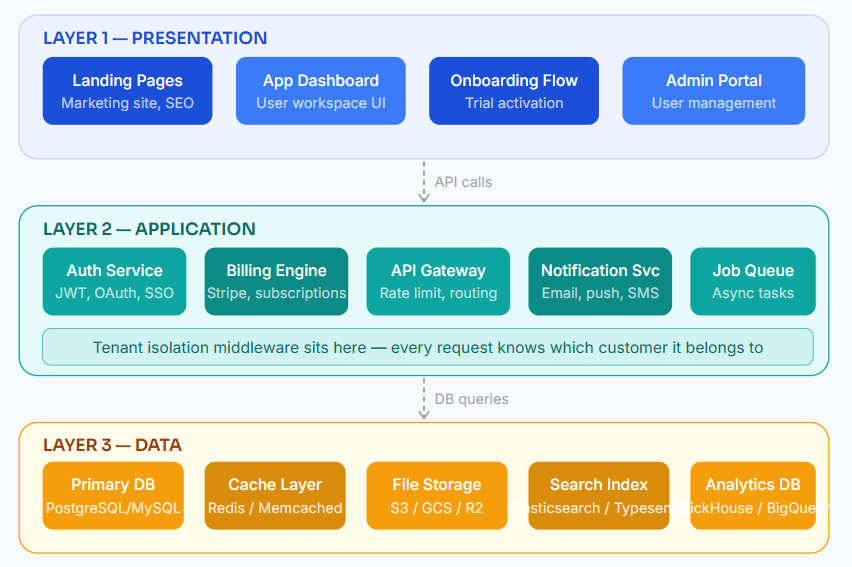
Every well-built SaaS product — regardless of what it does — is built on three foundational layers. Understanding how they work together is the starting point for any architecture decision.
Layer 1: The presentation layer
This is everything the user directly touches. For a SaaS product, the presentation layer typically includes two distinct parts: the marketing website (used for SEO, lead generation, and customer education) and the product interface (the actual dashboard, forms, reports, and features users pay for).
Many early-stage SaaS teams make the mistake of treating these as the same thing. They’re not. The marketing site should be optimised for speed, SEO, and conversion. The product dashboard needs to prioritise reliability, real-time updates, and smooth interaction patterns.
Layer 2: The application layer
This is the brain of your SaaS product. It handles authentication, business logic, background jobs, billing, notifications, and everything else that actually makes the product work. In modern SaaS architecture, this layer is usually built as a collection of services — either microservices or a modular monolith — rather than a single, all-in-one application.
Layer 3: The data layer
Databases, caches, file storage, search indexes, and analytics pipelines all live here. The data layer is where multi-tenancy decisions become critically important, and where architectural mistakes are hardest to undo later.
Multi-Tenancy: The Defining Architectural Decision
If there’s one concept that separates SaaS architecture from standard web application architecture, it’s multi-tenancy. This means that a single deployment of your software serves multiple customers (tenants), each of whom expects their data to be completely isolated from every other customer.
How you implement multi-tenancy affects your security posture, query performance, upgrade complexity, and how much it costs to serve each customer. There are three main approaches:
| Model | How it works | Best for | Risk |
|---|---|---|---|
| Shared database, shared schema | All tenants in one DB, separated by a tenant_id column | Early-stage, cost-sensitive SaaS | Medium Data leaks if filter missed |
| Shared database, separate schemas | One DB, each tenant gets its own schema namespace | Mid-market B2B SaaS | Lower Good isolation balance |
| Separate databases per tenant | Each enterprise tenant has a dedicated database | Enterprise / compliance-heavy | Lowest High infra cost |
Common mistake: Teams starting with a shared-schema model often forget to add tenant_id indexes on every table. At scale, queries slow to a crawl and a missing filter can expose one customer's data to another.
For most product-led growth (PLG) SaaS companies, the shared database with separate schemas model hits the right balance. It keeps infrastructure costs reasonable while giving you proper data isolation and making per-tenant backups and migrations much easier.
Choosing the Right SaaS Tech Stack
There’s no universally “correct” SaaS tech stack. The right choices depend on your team’s experience, the nature of your product, your scaling requirements, and your timeline. That said, some combinations have proven themselves across dozens of successful SaaS products.
Frontend stack for SaaS
The dominant approach in 2026 is React with Next.js for the product interface and marketing site. Next.js gives you server-side rendering for SEO on public pages, static generation for documentation and landing pages, and a clean API layer for backend communication. For teams wanting a lighter option, SvelteKit and Astro have strong followings.
Backend and API layer
Node.js remains extremely popular because it shares the JavaScript ecosystem with the frontend team, reducing context switching. For data-intensive or ML-adjacent SaaS products, Python (FastAPI or Django) is the more natural choice. Go is gaining serious traction where raw performance matters.
| SaaS Type | Recommended Backend | Database | Cache |
|---|---|---|---|
| B2B productivity tool | Node.js / NestJS | PostgreSQL | Redis |
| Analytics / reporting SaaS | Python / FastAPI | ClickHouse + Postgres | Redis |
| E-commerce SaaS | Node.js or Ruby on Rails | PostgreSQL | Redis + CDN |
| Dev tooling / API-first | Go or Rust | PostgreSQL / TimescaleDB | Redis |
| AI-powered SaaS | Python (FastAPI) | PostgreSQL + vector DB | Redis |
Need a SaaS Architecture Expert?
From initial planning to full-stack development, we help startups and growing businesses build scalable, production-ready SaaS products.
API Design and Integrations in SaaS Architecture
APIs are the connective tissue of modern SaaS architecture. They allow your frontend to talk to your backend, enable third-party integrations, and power partner or customer developer ecosystems. Getting your API design right early saves enormous refactoring pain later.
REST vs GraphQL: what’s the right choice?
For most SaaS products, REST is the safer, more maintainable default. Use GraphQL when your product has genuinely complex, highly variable data requirements — such as a business intelligence or reporting tool where dashboards are user-customised.
🔵 REST API
- Simpler to cache and reason about
- Better for public APIs and partner integrations
- Wide tooling support (Swagger, Postman, etc.)
- Easier to version (
/v1/,/v2/) - Preferred for most B2B SaaS products
🟢GraphQL
- Clients request exactly the data they need
- Reduces over-fetching in complex UIs
- Single endpoint simplifies some integrations
- Steeper learning curve for teams
- Best for data-rich, highly variable UIs
Webhooks: the underrated integration tool
Webhooks allow your SaaS to push real-time event notifications to customer systems rather than waiting for them to poll your API. A billing webhook fires when a subscription renews. A data processing webhook fires when a job completes. If your SaaS integrates with other business tools, a solid webhook system dramatically increases your product’s stickiness and perceived value.
Related reading — How to build a secure webhook system for SaaS products | SaaS API versioning strategies that don't break client integrations
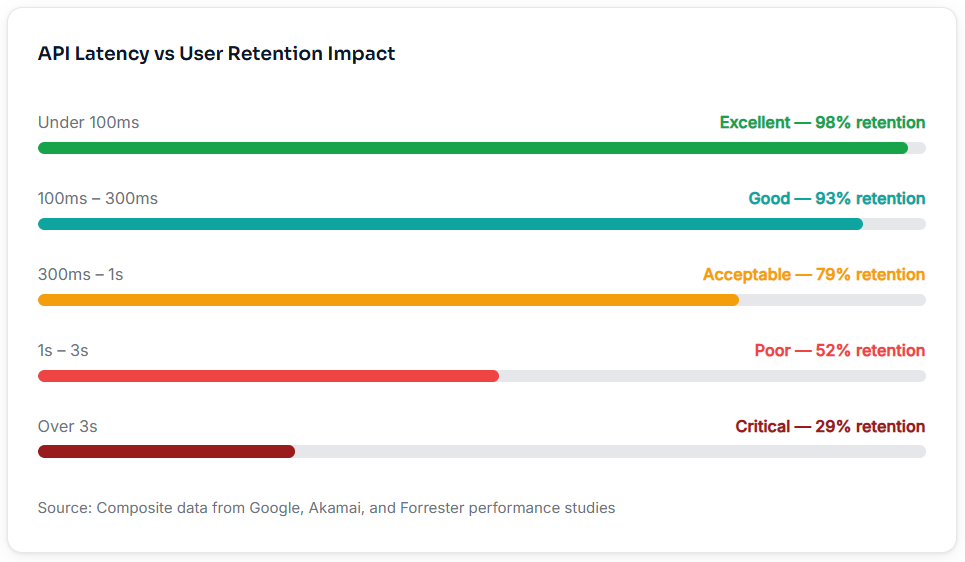
How API response time affects SaaS conversion
Security Architecture for SaaS Products
Security in a SaaS context isn’t an add-on — it’s a structural concern. You’re storing data from multiple businesses, often including sensitive customer records, financial information, or personally identifiable information. A breach doesn’t just hurt your business; it hurts every one of your customers’ businesses too.
Authentication and Authorisation
The modern SaaS security stack separates authentication (who are you?) from authorisation (what are you allowed to do?). For authentication, JWTs combined with refresh tokens have become standard. For authorisation, Role-Based Access Control (RBAC) is the minimum bar for any B2B SaaS product — allowing admins to grant different permission levels to different team members.
🔐
JWT + Refresh Tokens
Stateless auth that scales well with multiple service instances. Rotate refresh tokens on every use.
🔑
OAuth 2.0 / SSO
Enterprise customers expect to use their company identity provider (Okta, Azure AD). Support it from the start.
🛡️
RBAC
Roles like Admin, Editor, Viewer — scoped to each tenant’s workspace. Never let one tenant’s roles bleed into another’s.
📋
Audit Logging
Every sensitive action should write to an immutable audit log. Required for SOC 2, HIPAA, and enterprise sales.
Data Encryption and Compliance
Encrypt data at rest and in transit as a baseline — this is not optional in 2026. For regulated markets, you’ll also need to consider data residency (which region your data lives in), GDPR compliance for EU customers, and SOC 2 certification if you’re selling to enterprise accounts. Each of these requirements should be reflected in your architecture decisions early — retrofitting compliance is significantly more expensive than building for it from the start.
Performance and Scalability Architecture
Scalability is often treated as a future problem. “We’ll deal with it when we have more users.” But the reality is that scaling bottlenecks tend to show up at the worst possible times — when you’re getting traction, when a big customer signs, or when you get press coverage that drives a traffic spike. The right architecture builds scaling capacity in incrementally rather than all at once.
Horizontal vs Vertical Scaling
Vertical scaling means giving your server more RAM and CPU. It works up to a point, but has a ceiling and requires downtime. Horizontal scaling means running more instances of your service behind a load balancer. This is the model modern SaaS infrastructure is built on — it can theoretically scale to any load, and individual instance failures don’t take the whole product down.
Featured snippet answer: To scale a SaaS application horizontally, you run multiple stateless instances of your application behind a load balancer, store session data in a shared cache (like Redis), and use a managed database that supports read replicas or connection pooling. This allows each instance to handle requests independently without coordination.
Caching Strategy
A well-designed caching layer can reduce your database load by 70–90% for read-heavy SaaS workloads. The key is caching at the right level: use Redis for frequently-accessed user data and API responses, CDN caching for static assets and public pages, and database query caching for expensive aggregate queries used in dashboards and reporting.
Request Handling Capacity: Monolith vs. Horizontally Scaled SaaS
Horizontal SaaSMonolith
Common SaaS Architecture Mistakes (and How to Avoid Them)
Understanding the right patterns is useful. Understanding the wrong ones — and why they fail — is often more valuable. Here are the mistakes that consistently derail SaaS products:
1: Building as a monolith with no module separation — A single, undivided codebase works for a prototype. For a product, it becomes a maintenance nightmare that makes scaling individual components nearly impossible.
2: Skipping tenant isolation — The “I’ll add proper multi-tenancy later” plan almost never works. Adding it retroactively requires restructuring your entire data model under production load.
3: No background job system — Doing long operations (sending emails, processing files, generating reports) synchronously in API requests destroys performance and user experience. Build an async job queue early.
4: Direct DB calls from the frontend — Whether via exposed ORM endpoints or client-side DB connections, this is a security disaster. Every data operation must go through your API layer.
5: Direct DB calls from the frontend — Whether via exposed ORM endpoints or client-side DB connections, this is a security disaster. Every data operation must go through your API layer.
6: Mixing concerns in your database — Storing application state, user session data, job queues, and analytics data all in one relational database creates contention and makes scaling any individual concern very difficult.
“The SaaS products that scale well aren’t the ones built with the most advanced technology — they’re the ones built with the clearest boundaries between concerns.”
“The SaaS products that scale well aren’t the ones built with the most advanced technology — they’re the ones built with the clearest boundaries between concerns.”
Keyword Cluster & Internal Linking Strategy
| Cluster | Primary / Target Keyword | LSI / Secondary Keywords | Intent | Suggested Anchor Text |
|---|---|---|---|---|
| Pillar | saas website architecture | cloud software architecture, SaaS platform design | Informational | saas website architecture guide |
| Tech Stack | saas tech stack | best stack for SaaS, SaaS backend framework | Commercial | choosing a SaaS tech stack |
| Multi-tenancy | multi-tenant SaaS architecture | tenant isolation, shared schema, separate DB per tenant | Informational | how multi-tenancy works in SaaS |
| Security | SaaS security architecture | RBAC SaaS, JWT auth, SOC2 compliance SaaS | Informational | SaaS security best practices |
| Performance | SaaS scalability | horizontal scaling, CDN SaaS, Redis caching SaaS | Informational | scaling a SaaS application |
| API | SaaS API design | REST vs GraphQL SaaS, webhook architecture, API gateway | Informational | SaaS API architecture patterns |
Frequently Asked Questions
The best architecture for a SaaS application depends on your stage and scale, but a well-structured three-layer approach — presentation, application, and data — forms the foundation. For most startups, a modular monolith (with clear internal boundaries) that can evolve into microservices provides the best balance of speed and scalability. The critical requirements are multi-tenant data isolation, a dedicated auth service, a background job queue, and an API layer that the frontend communicates through. Avoid premature complexity, but do enforce architectural boundaries from day one.
Multi-tenancy means one deployment of your software serves multiple customers (called tenants), each seeing only their own data. The three main approaches are: shared database with a tenant_id column on every table (cheapest, most risk), shared database with separate schemas per tenant (good balance for most B2B SaaS), and separate databases per tenant (most secure, highest cost). The right choice depends on your security requirements, customer size, and compliance obligations. Most growth-stage SaaS products use schema-per-tenant or row-level isolation with strong database policies.
A regular web application typically serves one organisation or one type of user. A SaaS architecture is specifically designed to serve multiple independent customers (tenants) simultaneously, with each customer’s data completely isolated from others. SaaS products also require built-in subscription billing, multi-user workspaces, role-based access controls, high availability guarantees, and infrastructure designed for continuous deployment. The scale, reliability requirements, and data isolation complexity are the defining differences.
Scaling a SaaS application involves several layers working together. At the application layer, design services to be stateless so you can run multiple instances behind a load balancer (horizontal scaling). Store session data in Redis rather than in-memory. At the database layer, add read replicas for heavy read workloads and use a connection pooler like PgBouncer. Implement a caching layer to reduce DB load by 70–90% for read-heavy operations. Use a CDN for static assets and public pages. Finally, break slow operations (reports, emails, file processing) into background jobs so they don’t block your API response times.
For most early and growth-stage SaaS products, a well-structured modular monolith is the right starting point. Microservices add significant operational complexity — distributed tracing, service discovery, inter-service authentication, deployment orchestration — that early teams rarely need and often can’t maintain efficiently. A modular monolith enforces good internal boundaries while keeping deployment and debugging simple. Once your product has product-market fit, significant traffic, and a team of 10+ engineers, you can extract specific high-load or independently-deployable services as genuine microservices.
Conclusion: Architecture Is a Product Decision
The most important takeaway from this guide is that SaaS website architecture is not just a technical decision — it’s a business decision. The choices you make about multi-tenancy, your API structure, how you handle authentication, and how you plan for scale directly affect how fast you can ship features, how quickly you can onboard enterprise customers, and how much it costs to serve each user as you grow.
The good news is that you don’t need to solve every problem up front. What you need is a clear understanding of the core principles, sensible defaults for your stage of growth, and firm architectural boundaries that let you evolve specific components as requirements change.
Build on three clear layers. Get multi-tenancy right from the start. Use an async job queue for anything that shouldn’t block a user request. Keep your API layer between your frontend and your data. Cache aggressively. Encrypt everything. And audit every sensitive action.
If you do those things, you’ll have built something that can scale — and something your team will still enjoy working with two years from now.
Ready to Build Your SaaS Product the Right Way?
Whether you need a full SaaS architecture review, help designing your tech stack, or a development partner to build it — we’re ready to help. View our profiles on Upwork and Fiverr and let’s get started.