

Somewhere inside your business right now, there’s a spreadsheet that quietly runs more of your operation than any piece of paid software you own. Maybe three people are emailing each other the “final_v3_updated” version of it every week. If that sounds familiar, you’re not looking at a messy file. You’re looking at an unlaunched product.
I’ve spent years building and auditing tools like this for clients across SaaS, e-commerce, and service businesses, and the pattern repeats constantly: the hard part the logic, the pricing, the workflow is already done inside the spreadsheet. What’s missing is the wrapper that turns it into something you can hand to a customer and charge for. This guide covers how to recognize when a spreadsheet is ready to become a SaaS product, the three realistic paths to get there, a step-by-step build framework, common mistakes, and what it actually costs.
Learn About: SaaS Platform Development Cost
What Does It Mean to Turn a Spreadsheet Into a SaaS Product?
Turning a spreadsheet into a SaaS product means taking the logic, formulas, and data structure you’ve already built in a tool like Google Sheets or Excel and wrapping it in a proper interface, login system, and billing layer so other people can use it as a self-serve online tool without ever seeing the underlying spreadsheet. The spreadsheet keeps doing the calculations; a web app or dashboard sits on top of it and handles the parts customers actually interact with.
In practice, this usually means one of two things: either the spreadsheet becomes the invisible backend powering a lightweight web app, or its logic gets rebuilt from scratch inside a dedicated SaaS platform once the idea proves itself. Both are valid, the right one depends on how far you want to scale.
Learn About: How to Scale a SaaS Business
Why So Many SaaS Ideas Start Life as a Spreadsheet
Spreadsheets are, quietly, the most-used app-building tool on the planet. They’re where people first model a pricing calculator, a booking system, or a client dashboard because they’re fast to change and don’t need anyone’s approval to try something new. That makes a spreadsheet an unusually good MVP: by the time you’re considering a SaaS product, real people have already used it, broken it, and told you what’s missing. You’re not guessing at product-market fit, you’re formalizing something that already works.
The catch is that spreadsheets don’t scale socially. They fall apart once more than a handful of people need access at once, want their own private view of the data, or expect to pay for it. That breaking point is usually the exact signal that it’s time to build.
Learn About: 9 Common SaaS SEO Mistakes
Signs Your Spreadsheet Has Outgrown Itself
Not every internal spreadsheet needs to become a product. But a few recurring signals tend to show up right before someone decides to make the leap:
| Signal | What It Usually Looks Like |
| Manual copying | People duplicate the file for themselves instead of sharing one source of truth. |
| You’re the bottleneck | Every update, formula fix, or new user request routes through you personally. |
| Version chaos | Multiple copies exist with different names, and nobody’s sure which one is current. |
| People want their own view | Clients or teammates ask for a version filtered to just their data. |
| Formulas keep breaking | One wrong keystroke in the wrong cell corrupts calculations for everyone. |
| Someone offered to pay | A client or colleague has directly asked if they can just use “your tool.” |
The Three Realistic Paths From Spreadsheet to SaaS Product
There isn’t one correct way to make this jump; there are three, each suited to a different stage of ambition. Most failed attempts I’ve seen came from picking the wrong path for where the project actually was, not from picking a bad tool.
Path 1: Spreadsheet-as-a-Backend
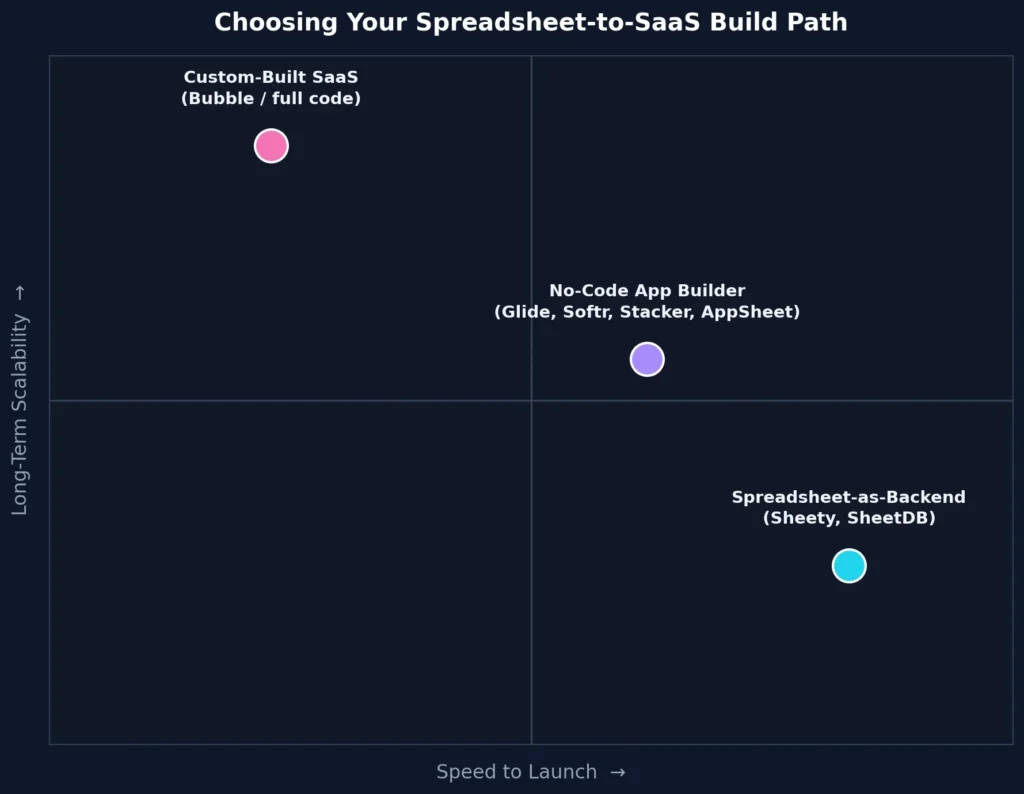
Tools like Sheety, SheetDB, and Rows turn your existing sheet into a live API in minutes, so a simple website or dashboard can read and write data straight from it. Nothing about your spreadsheet changes you’re just giving other software a doorway into it.
Best for: Validating demand fast, internal tools, or a lightweight public tool you want live within a week.
Path 2: A No-Code App Builder on Top of Your Sheet
Platforms like Glide, Softr, Stacker, and AppSheet connect directly to Google Sheets or Airtable and generate a full front-end logins, user roles, forms, dashboards, even basic billing without you writing code. This is the sweet spot for most people reading this: it looks and behaves like real software, but your spreadsheet still thinks of the scenes.
Best for: Launching a genuine paid product to real customers while keeping build costs and timelines low.
Learn About: SaaS Development Agency vs Freelancer
Path 3: A Fully Custom-Built SaaS Application
Once a spreadsheet-backed tool proves itself, it usually needs rebuilding on a proper database and application framework (often starting in a tool like Bubble before graduating to full custom code). This removes the row-count limits, speed issues, and security gaps spreadsheets eventually hit under real production load.
Best for: Products with proven traction that need to scale past a few hundred active users or handle sensitive customer data.
| Path | Time to Launch | Typical Cost Range | Scalability Ceiling |
| Spreadsheet-as-a-Backend | 1–2 weeks | Low ($) | Low — fine for small, simple tools |
| No-Code App Builder | 3–6 weeks | Moderate ($$) | Medium — solid for early-stage SaaS |
| Custom-Built SaaS | 2–4+ months | Higher ($$$) | High — built to grow with the business |
Not sure which path fits your spreadsheet?
If you want a fast, honest gut-check on whether your spreadsheet is actually SaaS-ready and which of the three paths above fits it best, I run a quick spreadsheet-readiness review as a Fiverr gig. You’ll get a short breakdown before you spend a rupee or a dollar on tools.
A Step-by-Step Framework for Building It
Step 1: Validate the Workflow, Not Just the Data
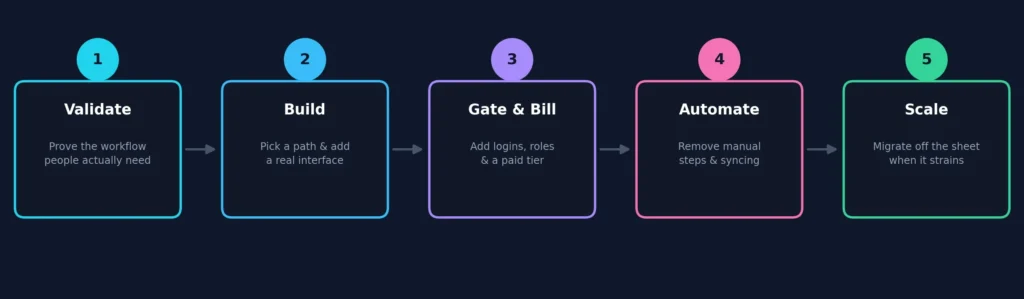
Before touching any tool, confirm people want the workflow your spreadsheet automates not just that the data is useful. Ask three or four people who’d use the finished product to walk through it with you live. If they hesitate or want something the sheet doesn’t do, that’s worth knowing before you build, not after.
Step 2: Clean Up the Data Structure First
Most personal spreadsheets are structured for convenience, not software. Merged cells, inconsistent columns, and formulas that reference other tabs by position rather than name will all cause problems once an app tries to read them. Rebuild it as clean rows and columns, one record per row, before connecting any tool.
Step 3: Pick Your Build Path
Match your choice to the three paths above rather than whichever tool you’ve heard of most. A tool that’s overkill for a two-week validation test slows you down; one that’s too limited forces a rebuild in three months anyway.
Step 4: Design a Real Interface
Customers should never see a spreadsheet, even if one runs underneath. Replace raw grids with dashboards, filtered views, forms, and clear navigation. This is usually the biggest jump in perceived value the logic often doesn’t change at all, but the product suddenly feels like software worth paying for.
Step 5: Add Authentication, Roles, and Multi-Tenancy
This step turns a shared file into an actual product: separate logins so each customer only sees their own data, and role-based permissions so an admin can edit while a viewer can only read. Most no-code app builders handle this natively, one of the main reasons to use them over a bare spreadsheet API.
Step 6: Turn Access Into Revenue
Connect a billing tool such as Stripe and decide on a pricing model early: flat monthly fee, usage-based, or tiered by feature. Keep the first model simple; you can add tiers once you understand how people actually use the product.
Want the build handled end-to-end?
Steps 4 through 6 interface, permissions, and billing are where most self-built projects stall out. If you’d rather brief someone and get a working product back, this is exactly the kind of no-code SaaS build I take on through Upwork.
Step 7: Automate the Manual Steps
Once the product is live, find every place you’re still manually moving data, exporting a CSV, updating a status by hand, or sending a reminder email yourself. Zapier, Make, or native automations inside your app builder can usually handle these, and removing them is what makes a product feel finished rather than half-automated.
Step 8: Test With a Small Group Before Announcing Anything
Put the product in front of five to ten real users before any public launch. Watch where they get stuck rather than asking if they liked it. People are polite, but where they hesitate or click the wrong thing tells you what to fix.
Step 9: Know When to Graduate Off the Spreadsheet
A spreadsheet backend is genuinely fine for hundreds of users and modest datasets. The signals to move on are consistent: pages start loading slowly, you hit row or API-call limits, or you need reporting the formulas can no longer handle cleanly. None of that means the approach failed it means it did its job as a validation layer and the product earned the next stage.
Common Mistakes When Making This Transition
- Building the full interface before validating that anyone besides you wants it.
- Skipping data cleanup, then debugging an app that’s actually reacting to messy source data.
- Charging money before adding proper user separation, so customers can see each other’s data.
- Choosing a custom build for an untested idea, burning months and budget on the wrong path.
- Never automating the manual glue work, so the “finished” product still needs daily babysitting.
Learn About: How to Validate a SaaS Idea Before Spending $1
How Much Does It Cost to Turn a Spreadsheet Into a SaaS Product?
Cost depends almost entirely on which path you choose. A spreadsheet-as-a-backend tool can be live for the price of a monthly subscription plus a few hours of setup. A no-code app builder typically adds a platform fee plus your own time or a freelancer’s, since most of the cost is in designing the interface and connecting the logic correctly. A custom-built SaaS application is the most expensive route by far, since it involves proper software development rather than configuration.
If you want the fuller picture- including how agencies and freelancers typically price each stage I’ve broken down how much a SaaS platform actually costs to build in more detail, which is worth reading before you commit to a path.
Learn About: What is B2B SaaS?
A Real Example: From Internal Tracker to Paid Tool
One client I worked with had a Google Sheet that calculated shipping and customs costs for small import orders, refined over roughly a year of edge cases. Other small importers kept asking to “borrow” it. We didn’t touch the calculation logic at all it already worked. We connected the sheet to a no-code app builder, added simple logins so each business only saw its own saved calculations, and layered a flat monthly subscription on top through the platform’s built-in Stripe integration.
The build took under a month, most of it spent on the interface rather than the logic, because the hardest problem the actual cost formula had already been solved inside the spreadsheet. That’s the pattern worth remembering: the spreadsheet usually isn’t the obstacle. It’s most of the product, already built.
Frequently Asked Questions
Yes, for most early-stage products. No-code tools like Glide, Softr, and Stacker connect directly to Google Sheets and Airtable and can generate logins, dashboards, and even payment collection without custom code. Coding usually only becomes necessary once the product scales well beyond its first few hundred users.
It depends on your data source and how the app needs to work. Glide and Softr suit Google Sheets or Airtable-based apps with a clean, modern interface. Stacker leans toward internal tools and client portals. AppSheet integrates tightly with Google Workspace for teams already living in Sheets and Drive.
Most no-code app builders offer a direct Stripe integration: connect your account, set pricing inside the builder, and it handles checkout and subscriptions for you. With a bare spreadsheet-as-a-backend setup, you’ll usually need a separate checkout tool or a short script linking payment events back to your sheet.
For small to mid-sized products, yes as long as access is properly separated so each customer only sees their own data and the sheet itself isn’t publicly shared. It’s not the right foundation for highly sensitive data at scale, which is why growing products eventually migrate to a dedicated database.
Move once you notice consistent slowdowns, hit your platform’s row or API-call limits, or need reporting the formulas can’t handle cleanly anymore. In practice, that’s usually somewhere between a few hundred and a couple thousand active users, depending on how much data each one generates.
Key Takeaways
- A spreadsheet that people rely on daily is usually a validated idea, not just a messy file.
- Choose your build path: spreadsheet-as-backend, no-code app builder, or custom SaaS based on where the idea actually is, not on hype.
- Interface, user separation, and billing are what turn a shared file into a product people will pay for.
- Migrate off the spreadsheet only once real usage tells you it’s straining, not before.
If your spreadsheet has reached the point where people ask for their own login, or you’re the only one who can fix it when something breaks, it’s likely past the validation stage. The framework above is what I use with clients moving through exactly this transition. The real work is deciding which path matches your current stage and committing to it.
Ready to move your spreadsheet forward?
Whether you need a second opinion on your build path, a full no-code build, or a developer to take it from spreadsheet to a genuinely scalable SaaS product, I take on these projects directly through Upwork and Fiverr.