Introduction: Your SaaS Is Growing, but Why Is Your Database Getting Slower?
Your SaaS application worked perfectly when it had 100 customers.
Dashboard pages loaded quickly. Reports generated in seconds. Users could search records, update information, and complete transactions without noticeable delays.
Now your application has thousands of customers.
Suddenly: Dashboard loading takes several seconds. Database queries become slower under concurrent reader traffic. Reports time out during busy business hours. Customers experience delays when saving records or updating settings. * Database CPU usage spikes to 85%+ during peak periods.
Your engineering team starts discussing database upgrades.
Your first instinct might be to purchase a larger database server instance with more vCPUs and RAM.
But that may not solve the actual problem.
A database can become slow because of missing indexes, inefficient SQL queries, excessive concurrent read traffic, poor connection pool management, or an architectural workload that exceeds the physical capacity of a single database instance.
Each problem requires a fundamentally different solution.
Database indexing, read replicas, and sharding solve different scaling challenges. Choosing the wrong strategy can increase your cloud bills by thousands of dollars each month without fixing performance. Before re-architecting your storage, ensure you understand foundational SaaS database design fundamentals and the broader SaaS product development process.
This guide explains how SaaS engineering teams can identify database bottlenecks, master the three major scaling techniques, and determine when each approach makes sense. We will use practical PostgreSQL examples to demonstrate real-world implementation decisions.
---
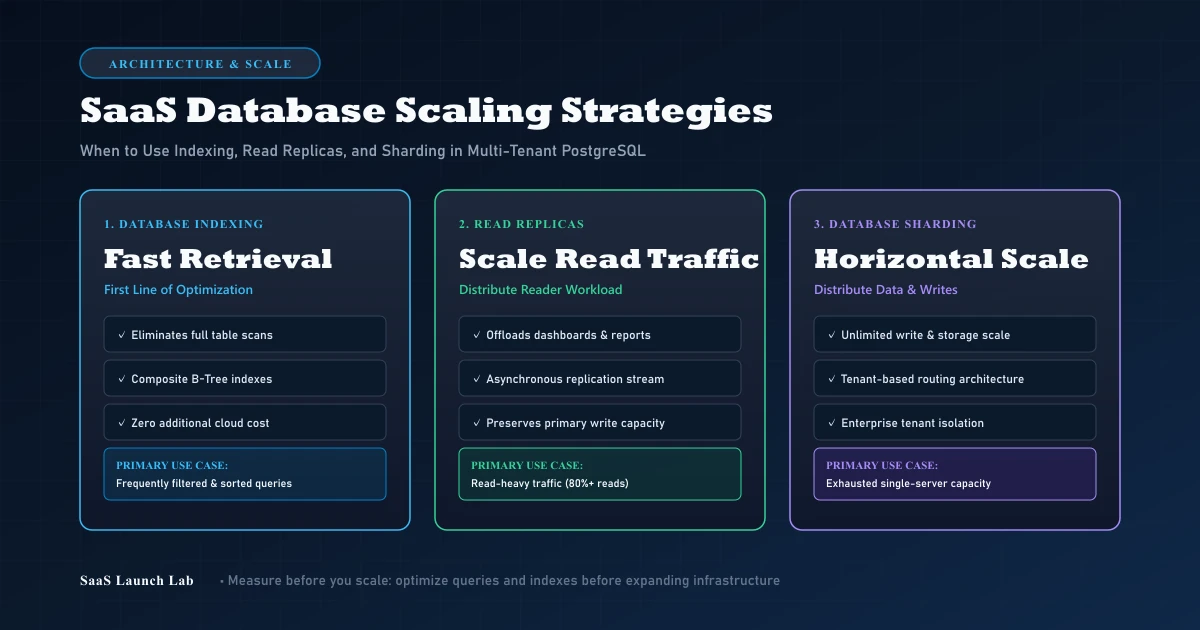
Quick Answer: When Should You Use Indexing, Read Replicas, or Sharding?
| Strategy | Best used when | Main benefit | Operational Cost |
|---|---|---|---|
| Database indexing | Queries scan too many rows or sort inefficiently | Faster query execution without hardware upgrades | $0 / mo (Zero infra changes) |
| Read replicas | Read traffic is overwhelming the primary database | Distributes read workload across secondary nodes | +$85 – $350 / replica / mo |
| Sharding | A single database cannot handle total write throughput or storage | Distributes data and write workload across database nodes | +$1,000 – $4,000+ / mo |
The recommended progression for SaaS applications is:
$$\text{Measure Performance} \longrightarrow \text{Optimize Queries} \longrightarrow \text{Add Composite Indexes} \longrightarrow \text{Scale Vertically} \longrightarrow \text{Add Read Replicas} \longrightarrow \text{Partition or Shard}$$
This is not an arbitrary sequence. The right intervention depends strictly on your measured bottleneck. Use the interactive scaling advisor below to diagnose your database workload:
SaaS Database Scaling Strategy Advisor
Diagnose bottlenecks and determine whether to use indexing, read replicas, or sharding.
Can Reporting/Analytics Tolerate ~50ms Replication Lag?
Necessary for offloading reads to asynchronous read replicas.
Targeted B-Tree / Composite Indexing & Query Plan Tuning
Run `EXPLAIN (ANALYZE, BUFFERS)` on the slowest 5 queries. Replace Seq Scans on tenant_id + sort columns with composite indexes.
Eliminates sequential scans on large tables. Low cost, immediate latency drop, but does not scale write throughput.
Offloads dashboard queries, background jobs, and heavy reports. Requires connection routing and tolerance for replication lag.
Partitions tenants across independent database servers. Scales writes and storage horizontally, but adds high architectural complexity.
---
1. Why SaaS Databases Become Performance Bottlenecks
A SaaS application typically relies on a database to handle customer records, subscriptions, transactions, permissions, reports, and application activity.
As customers and application activity grow, the database receives more requests.
However, more records do not automatically mean slower performance.
A well-indexed database with efficient queries can handle substantial workloads on modest hardware. Conversely, a smaller database with inefficient queries and missing indexes can become slow much earlier.
Here are six common reasons databases struggle as SaaS products grow:
1. Missing or Inefficient Indexes Imagine your SaaS stores millions of customer transactions. Whenever a customer opens their transaction history, the application runs a query to retrieve records belonging to that customer.
Without a suitable index, PostgreSQL must perform a sequential scan (Seq Scan), examining every single row in a multi-gigabyte table to find the matching records. This drives query latency from 5 milliseconds to several seconds and consumes massive CPU cycles.
2. Too Many Concurrent Read Requests Dashboards, reports, analytics, search, and application pages frequently retrieve information from the database. When thousands of users request information simultaneously, the primary database becomes overloaded with read operations.
This is especially common in B2B SaaS products where 80% to 90% of all database operations are reads.
3. Inefficient Database Queries A query can become expensive because of: Unnecessary joins across unindexed foreign keys. N+1 query problems triggered by object-relational mappers (ORMs like Prisma, Drizzle, or TypeORM). Large unpaginated result sets loading 10,000 rows into memory. Repeated database requests that could be cached. Expensive sorting (`ORDER BY`) and aggregations (`GROUP BY`, `COUNT()`) without supporting indexes.
Adding more database capacity or replicas will not fix fundamentally inefficient query patterns.
4. Database Connection Exhaustion
Each application instance opens multiple database connections. As your SaaS scales horizontally across serverless functions, containers, or Kubernetes pods, the number of concurrent connections can quickly exceed PostgreSQL's max_connections threshold.
Without connection pooling, PostgreSQL spends substantial memory and CPU overhead managing connection handshakes rather than executing SQL. Introducing connection pooling with PgBouncer solves this bottleneck without requiring database hardware upgrades—a pattern also critical when building a scalable SaaS API architecture.
5. Large Tables and Growing Data SaaS applications continuously generate data: Transaction records and ledger entries. Activity logs and audit trails. Webhook payloads and notification histories. Customer telemetry and reporting data.
When single tables exceed tens of millions of rows, maintenance operations such as index creation, autovacuuming, and backups become resource-intensive and lock-sensitive.
6. Uneven Multi-Tenant Workloads In a multi-tenant SaaS, one customer may generate significantly more database activity than others. For example, one enterprise customer might process thousands of API transactions every minute, while hundreds of smaller customers generate only a few dozen requests per hour.
This creates the classic noisy-neighbor problem, where one tenant's heavy analytics queries starve other tenants of CPU and I/O bandwidth. Mitigating this requires thoughtful multi-tenant database architecture and tenant-aware workload isolation.
---
2. Before Scaling: Identify the Actual Database Bottleneck
The most expensive mistake in database operations is introducing additional infrastructure before understanding why the database is slow.
Always start with measurement.
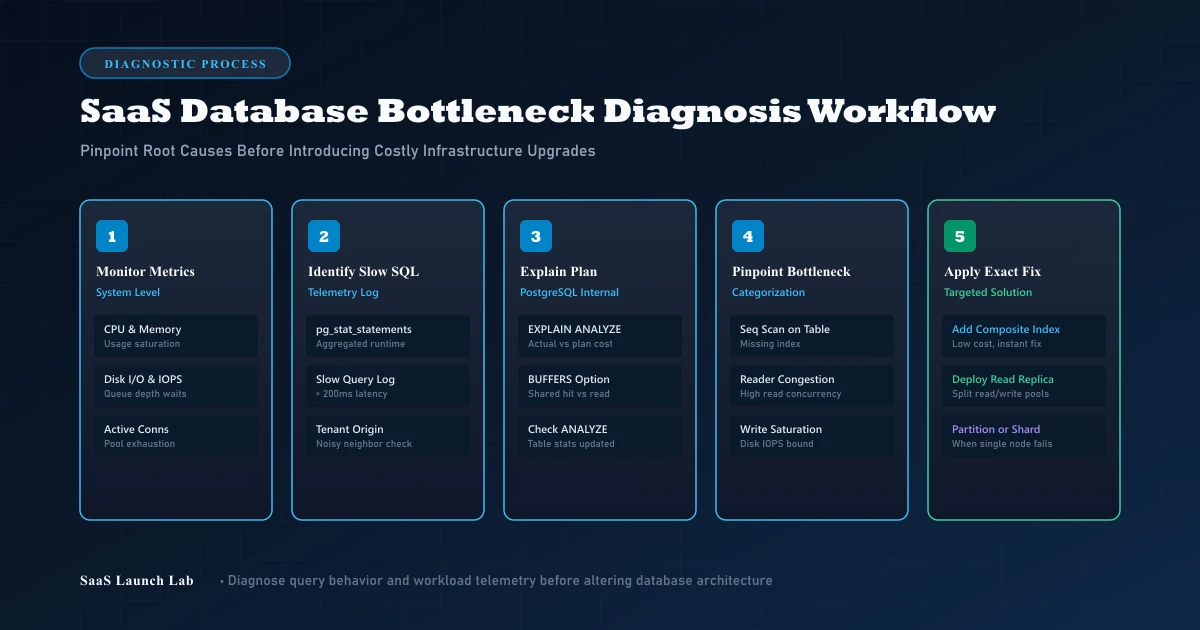
A. Monitor Database Performance Track these essential metrics to establish baseline behavior:
| Metric | What it tells you | Healthy SaaS Target |
|---|---|---|
| Query latency | How long queries take to execute | p95 < 50ms, p99 < 150ms |
| CPU utilization | Processing capacity consumed by queries | Sustained average < 65% |
| Memory utilization | Buffer cache pressure and swap activity | Buffer hit ratio > 99% |
| Disk I/O & IOPS | Storage read/write wait times | Queue depth < 2 |
| Active connections | Number of active PostgreSQL processes | < 80% of max_connections |
| Connection wait time | Time queries wait for an available pool slot | < 5ms average wait |
| Cache hit ratio | How often requested pages are served from RAM | > 99% for transactional tables |
| Replication lag | Delay between primary commit and replica visibility | < 100ms in same region |
| Lock waits | Queries blocked waiting for row or table locks | Zero sustained lock waits |
| Table growth | Rate of physical disk storage expansion | Predictable monthly growth |
Do not interpret any metric in isolation. For example, high CPU usage might indicate expensive unindexed queries, but it could also result from legitimate spikes in application traffic. Similarly, low CPU usage does not automatically mean your database is healthy; queries can be stalled waiting on disk I/O or lock contention.
B. Find Slow Queries in PostgreSQL
PostgreSQL provides the EXPLAIN command to show how the query planner will execute a statement.
To inspect estimated plan costs:
EXPLAIN
SELECT *
FROM transactions
WHERE tenant_id = 'tenant_123'
ORDER BY created_at DESC
LIMIT 50;
To inspect actual execution behavior and buffer usage, use EXPLAIN (ANALYZE, BUFFERS):
EXPLAIN (ANALYZE, BUFFERS)
SELECT *
FROM transactions
WHERE tenant_id = 'tenant_123'
ORDER BY created_at DESC
LIMIT 50;
Look for these red flags in the execution plan output:
1. `Seq Scan on transactions`: PostgreSQL is scanning the entire table because no matching index exists.
2. `Rows Removed by Filter: 1,500,000`: The engine evaluated millions of rows only to discard almost all of them.
3. `Buffers: shared read=45120 hit=1200`: High disk reads (shared read) indicate that the required data was not in RAM cache.
4. `Sort Method: external merge Disk`: Sorting exceeded work_mem and spilled to disk, severely degrading query performance.
[!WARNING]EXPLAIN ANALYZEactually executes the query! Be careful when analyzing expensive or data-modifying statements (UPDATE,DELETE) in production. Execute them within a rollbacked transaction block (BEGIN; EXPLAIN ANALYZE ...; ROLLBACK;) or test on a staging snapshot.
For detailed guidelines on interpreting plan trees, consult the official PostgreSQL Performance Tips documentation.
C. Check Database Statistics PostgreSQL relies on statistical samples of column distributions to decide between index scans, bitmap heap scans, and sequential scans. If statistics are outdated, the query planner may choose an inefficient plan.
Update table statistics manually:
ANALYZE transactions;Review database maintenance and autovacuum configuration before assuming that an expensive scaling architecture change is necessary. For deeper insights, review the PostgreSQL ANALYZE documentation.
---
3. Database Indexing: The First Optimization Many SaaS Applications Need
Database indexing is the highest-leverage, lowest-cost optimization available to engineering teams.
An index is a specialized data structure (typically a balanced tree, or B-tree) that allows the database to locate specific records in logarithmic time $\mathcal{O}(\log N)$ without examining every row in the table.
Example: A SaaS Transaction Table Consider a multi-tenant SaaS application storing financial transactions:
CREATE TABLE transactions (
    id UUID PRIMARY KEY,
    tenant_id UUID NOT NULL,
    customer_id UUID NOT NULL,
    amount NUMERIC(12, 2),
    status VARCHAR(32) NOT NULL,
    created_at TIMESTAMP WITH TIME ZONE NOT NULL
);
When a user visits their billing portal, the application queries:
SELECT id, amount, status, created_at
FROM transactions
WHERE tenant_id = 'c7a84e20-3b91-4e89-982e-1d5d14210080'
ORDER BY created_at DESC
LIMIT 50;
If the table only has an index on id (the primary key), PostgreSQL must scan every record across all tenants and sort them in memory.
Create a Composite Index To optimize this query pattern, create a composite index that matches both the filtering column and the sort order:
CREATE INDEX CONCURRENTLY idx_transactions_tenant_created
ON transactions (tenant_id, created_at DESC);
Using CONCURRENTLY allows PostgreSQL to build the index without acquiring an exclusive table write lock, ensuring zero downtime for active users.
With this index in place:
1. PostgreSQL performs an Index Scan directly on the tenant's subset of rows.
2. The rows are already physically ordered by created_at DESC within the index, completely eliminating the expensive memory sort operation.
3. Query execution time drops from 1,200ms to 2ms.
Common Index Types PostgreSQL supports specialized index types for different data patterns:
| Index Type | Typical SaaS Use Case | Supported Operators |
|---|---|---|
| B-Tree (Default) | Primary keys, foreign keys, tenant IDs, timestamps, equality and range queries | <, <=, =, >=, >, BETWEEN, IN |
| GIN (Generalized Inverted) | Multi-tenant JSONB documents, tags, arrays, and full-text search | @>, ?, ?&, @@ |
| BRIN (Block Range) | Massive append-only time-series tables (audit logs, telemetry) | <, <=, =, >=, > |
| GiST | Geospatial queries, IP address ranges, overlapping booking intervals | &&, @>, <@ |
| Hash | Exact equality comparisons only (rarely preferred over B-tree) | = |
For in-depth details on index mechanics, review the official PostgreSQL Indexes manual.
When Should You Create a Composite Index? A composite index covers multiple columns in a specific order:
CREATE INDEX idx_orders_tenant_status_date
ON orders (tenant_id, status, created_at DESC);
Column ordering follows the Equality-First, Range/Sort-Second rule:
Place equality columns first (`tenant_id = ?`, `status = ?`).
Place range or ordering columns last (created_at DESC).
An index on (tenant_id, status, created_at DESC) can serve queries that filter by tenant_id alone, or tenant_id and status. However, it cannot efficiently serve queries that filter only by status, because tenant_id is the leading index key.
The Hidden Cost of Too Many Indexes Indexes accelerate read operations, but they impose a write tax.
Every time your application executes an INSERT, UPDATE, or DELETE, PostgreSQL must update the table heap and every associated index. If a table has 12 indexes, a single write triggers 13 physical storage modifications.
Rules for index health:
Never create indexes speculatively; create them based on queries identified in `pg_stat_statements`.
Remove unused or duplicate indexes using pg_stat_user_indexes.
* Use partial indexes (WHERE status = 'active') to keep index size small when only a fraction of rows are queried.
---
4. Read Replicas: Scale Read-Heavy SaaS Workloads
When query indexing and vertical server resizing have been exhausted, but database CPU remains saturated by concurrent read traffic, read replicas are the next architectural step.
A read replica is an independent, read-only copy of your primary database. The primary instance handles all data modifications (INSERT, UPDATE, DELETE), while one or more read replicas asynchronously receive changes and serve read queries (SELECT).
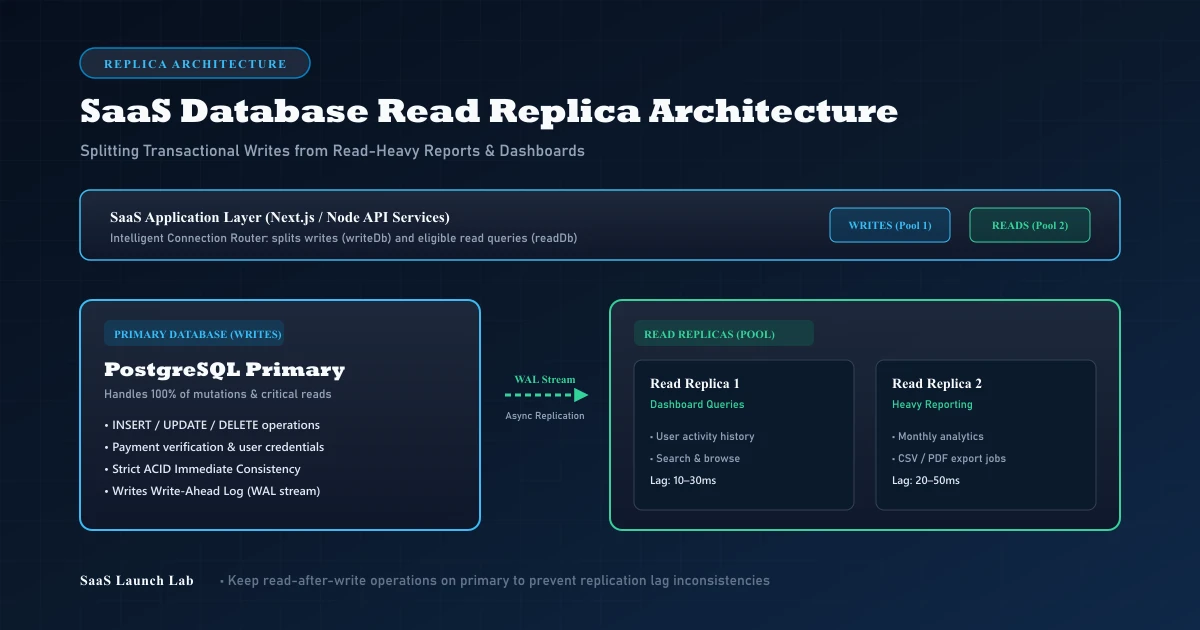
How Read Replicas Work In a typical SaaS platform, 85% of database queries are read operations: loading dashboards, displaying user profiles, generating reports, and querying settings.
By deploying read replicas: 1. The primary database is freed from reader congestion, preserving its resources for write transactions. 2. Read traffic is distributed across multiple replica nodes, scaling read throughput horizontally. 3. Heavy background reporting jobs and analytical exports cannot degrade customer-facing transaction performance.
Example: Separate Read and Write Connections
A production SaaS application maintains distinct connection pools for read and write operations. Here is a TypeScript example using the pg driver:
import { Pool } from 'pg';// Primary database connection pool for write operations const primaryPool = new Pool({ connectionString: process.env.DATABASE_PRIMARY_URL, max: 20, idleTimeoutMillis: 30000, });
// Read replica connection pool for read queries const replicaPool = new Pool({ connectionString: process.env.DATABASE_REPLICA_URL, max: 40, idleTimeoutMillis: 30000, });
// Execute write mutation on primary
export async function createTenantOrder(
tenantId: string,
amount: number,
customerId: string
) {
const result = await primaryPool.query(
INSERT INTO orders (id, tenant_id, customer_id, amount, created_at)
     VALUES (gen_random_uuid(), $1, $2, $3, NOW())
     RETURNING id
,
[tenantId, customerId, amount]
);
return result.rows[0];
}
// Execute analytical read query on replica
export async function getMonthlyRevenueSummary(tenantId: string) {
const result = await replicaPool.query(
SELECT DATE_TRUNC('month', created_at) AS month, SUM(amount) AS total_revenue
     FROM orders
     WHERE tenant_id = $1
     GROUP BY 1
     ORDER BY 1 DESC
,
[tenantId]
);
return result.rows;
}
```
Important: Read Replicas Can Have Replication Lag Most cloud databases (including Amazon RDS, Google Cloud SQL, and Supabase) use asynchronous replication.
This introduces a brief delay—known as replication lag—between when a write is committed on the primary and when that change is replayed on the replica (typically between 10ms and 150ms under normal network conditions).
The Read-After-Write Race Condition: 1. A customer updates their company name in the settings portal. 2. The mutation commits successfully to the primary database. 3. The page immediately redirects and queries the read replica to display the updated profile. 4. If the replica is 60ms behind, it returns the old company name. 5. The customer believes their update failed and clicks "Save" multiple times.
How to Handle Replication Lag
Route Read-After-Write to Primary: After executing a mutation, pin that user's subsequent reads to the primary database for 1 to 2 seconds (using a session cookie or cache timestamp).
Reserve Replicas for Lag-Tolerant Workloads: Historical analytics, CSV export jobs, search indexes, and weekly summary reports can easily tolerate several seconds of replication delay.
Monitor Replication Delay*: Continuously monitor pg_stat_replication.write_lag or cloud CloudWatch replication lag alarms. If a replica falls too far behind, temporarily route queries back to the primary.
For advanced configurations, explore the AWS Database Blog on Distributing Read Traffic and Amazon RDS Scaling and High Availability.
---
5. Database Sharding: When One Database Is No Longer Enough
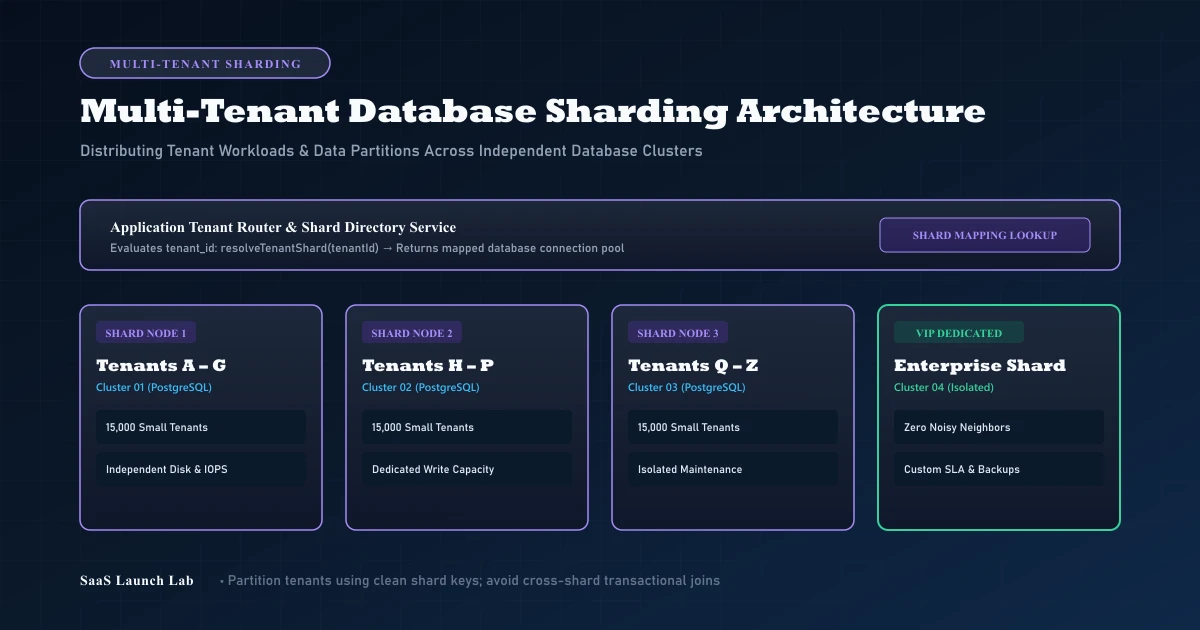
Database sharding is a horizontal partitioning technique where your application's data is split across multiple independent database instances, called shards.
Unlike read replicas—where each instance holds a full copy of the dataset—each shard holds a distinct subset of the data.
Example: A Multi-Tenant SaaS Application Imagine your SaaS serves 60,000 corporate customers. Together, these tenants generate: 400 million rows of activity logs per month. 12,000 sustained write operations per second. * 8 terabytes of transactional data.
A single PostgreSQL server—even a large instance with 128 vCPUs and 512GB of RAM—will eventually struggle with write throughput limits, checkpoint saturation, and vacuum maintenance.
By sharding based on tenant_id:
Shard 1 holds data for Tenants A through G.
Shard 2 holds data for Tenants H through P.
Shard 3 holds data for Tenants Q through Z.
Shard 4 hosts a single high-volume Enterprise tenant on dedicated infrastructure.
Each shard runs its own CPU, memory, and storage, scaling write throughput linearly.
Example: Tenant-Based Shard Routing The application layer uses a deterministic router or shard directory to select the target database:
import { Pool } from 'pg';interface ShardDirectory { [shardId: string]: Pool; }
const shardPools: ShardDirectory = { shard_1: new Pool({ connectionString: process.env.SHARD_1_DB_URL }), shard_2: new Pool({ connectionString: process.env.SHARD_2_DB_URL }), shard_3: new Pool({ connectionString: process.env.SHARD_3_DB_URL }), };
// Simple consistent hash function to map tenant UUID to a shard function resolveShard(tenantId: string): Pool { let hash = 0; for (let i = 0; i < tenantId.length; i++) { hash = (hash << 5) - hash + tenantId.charCodeAt(i); hash |= 0; } const shardKeys = Object.keys(shardPools); const selectedIndex = Math.abs(hash) % shardKeys.length; const shardName = shardKeys[selectedIndex]; return shardPools[shardName]; }
// Any database operation queries only the tenant's designated shard
export async function getTenantTransactions(tenantId: string) {
const pool = resolveShard(tenantId);
const result = await pool.query(
SELECT * FROM transactions WHERE tenant_id = $1 ORDER BY created_at DESC LIMIT 50,
[tenantId]
);
return result.rows;
}
```
Common Sharding Strategies
1. Tenant-Based Sharding: Each tenant resides entirely on one shard. This is the gold standard for B2B SaaS because 99% of queries include tenant_id, meaning queries execute against a single database without cross-node joins.
2. Hash-Based Sharding: A hash of the tenant ID determines shard placement, distributing tenants evenly across nodes.
3. Range-Based Sharding: Tenants are assigned based on alphabetic ranges or signup dates. This is simpler to implement but risks uneven growth (e.g., one shard filling up faster than others).
The Challenges of Sharding While sharding provides virtually unlimited write scalability, it introduces severe architectural complexity: No Cross-Shard Transactions: Standard ACID transactions across multiple shards require distributed two-phase commits (`2PC`), which are slow and fragile. Complex Global Reporting: Generating an administrative report across all customers requires querying every shard and aggregating the data in the application layer. Schema Migration Overhead: Every schema change (`ALTER TABLE`) must be applied safely across dozens of discrete database clusters. Operational Expense: Managing backup policies, failover monitoring, and connection pooling for multiple clusters significantly increases SaaS infrastructure costs.
When Should You Consider Sharding? Your sustained write IOPS exceed the limits of top-tier cloud database instances. Storage requirements exceed practical backup and restore windows (e.g. > 5TB). You must isolate high-compliance enterprise tenants into dedicated geographical regions. You have verified that indexing, query tuning, and read replicas cannot resolve the bottleneck.
---
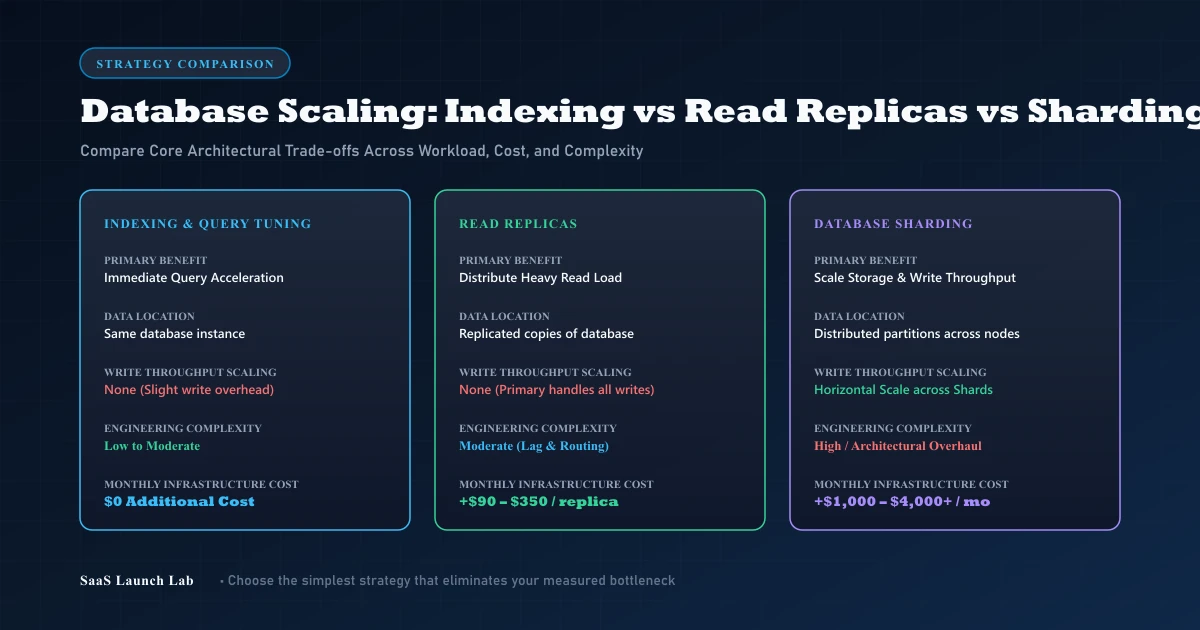
6. Indexing vs Read Replicas vs Sharding: Complete Comparison
Choosing the appropriate scaling strategy requires aligning your technical intervention with your measured bottleneck:
| Architectural Dimension | Database Indexing | Read Replicas | Database Sharding |
|---|---|---|---|
| Primary Objective | Accelerate individual query execution | Distribute high concurrent read traffic | Distribute data and write throughput |
| Data Placement | Stored on the same database node | Full dataset duplicated to read nodes | Data partitioned across multiple nodes |
| Read Scalability | High (eliminates table scans) | Very High (add replica instances) | High (distributes reads by shard) |
| Write Scalability | None (increases write overhead) | None (primary handles all writes) | Linear (independent write streams) |
| Engineering Complexity | Low to Moderate | Moderate (requires connection routing) | High to Extreme (distributed system) |
| Infrastructure Cost | $0 / month | Moderate (+$85 – $350/mo per node) | High (+$1,000 – $4,000+/mo cluster) |
| Data Consistency | Strict ACID (single node) | Eventual Consistency (replication lag) | ACID within shard; non-trivial across |
| Best Growth Stage | Early-stage to Enterprise | Growing SaaS (1,000–50,000 tenants) | High-scale SaaS (50,000+ tenants) |
Which Strategy Should You Choose?
| Your Measured Symptom | Recommended Immediate Action |
|---|---|
| Slow queries on large tables with high CPU | Run EXPLAIN (ANALYZE, BUFFERS) and add composite B-Tree indexes. |
| Sorting operations spilling to disk | Add indexes matching the ORDER BY clause; increase work_mem. |
| Dashboard reads overloading database during peak hours | Deploy 1–2 read replicas; route analytics to replica pools. |
| PostgreSQL `max_connections` errors | Introduce PgBouncer connection pooler in transaction mode. |
| CPU saturated despite optimal indexes and fast queries | Scale vertically (upgrade instance vCPU and RAM). |
| Single tenant consuming 60% of database resources | Move the noisy tenant to an isolated database shard. |
| Write IOPS and disk storage limits reached on primary | Implement tenant-based horizontal database sharding. |
---
7. Database Partitioning vs Sharding: Are They the Same?
Database partitioning and database sharding are frequently confused because both techniques divide large datasets into smaller chunks.
However, their underlying architectures are fundamentally different.
Database Partitioning Partitioning divides a large table into smaller sub-tables managed inside a single database instance.
In PostgreSQL, declarative table partitioning allows you to break a massive table (like activity logs) into monthly chunks:
-- Create partitioned parent table
CREATE TABLE audit_logs (
    id UUID NOT NULL,
    tenant_id UUID NOT NULL,
    event_name VARCHAR(64) NOT NULL,
    created_at TIMESTAMP WITH TIME ZONE NOT NULL
) PARTITION BY RANGE (created_at);
-- Create partition for November 2026 CREATE TABLE audit_logs_2026_11 PARTITION OF audit_logs FOR VALUES FROM ('2026-11-01 00:00:00+00') TO ('2026-12-01 00:00:00+00');
-- Create partition for December 2026 CREATE TABLE audit_logs_2026_12 PARTITION OF audit_logs FOR VALUES FROM ('2026-12-01 00:00:00+00') TO ('2027-01-01 00:00:00+00'); ```
When a query filters by date:
SELECT * FROM audit_logs
WHERE created_at >= '2026-11-15' AND created_at <= '2026-11-20';
PostgreSQL uses Partition Pruning to scan only audit_logs_2026_11, completely ignoring every other partition. For complete specifications, see the PostgreSQL Table Partitioning documentation.
Database Sharding Sharding distributes partitions across multiple independent database servers.
While partitioning helps PostgreSQL manage disk storage and index sizes on one server, sharding distributes the compute, memory, and write operations across discrete hardware nodes.
Key Differences
| Architectural Factor | Table Partitioning | Database Sharding |
|---|---|---|
| Hardware Boundary | Single database server | Multiple independent database nodes |
| Primary Benefit | Faster table maintenance & partition pruning | Linear write throughput & storage scaling |
| Query Complexity | Transparent to application SQL | Requires routing logic & shard awareness |
| ACID Guarantees | Full standard ACID guarantees | ACID within single shard only |
| Operational Effort | Low to Moderate (native PostgreSQL) | High (multi-cluster operations & routing) |
---
8. A Practical Database Scaling Roadmap for SaaS Startups
You do not need a Google-scale distributed database on day one. Introducing distributed architectures prematurely drains engineering velocity and multiplies operational costs.
Follow this progressive roadmap as your SaaS expands:
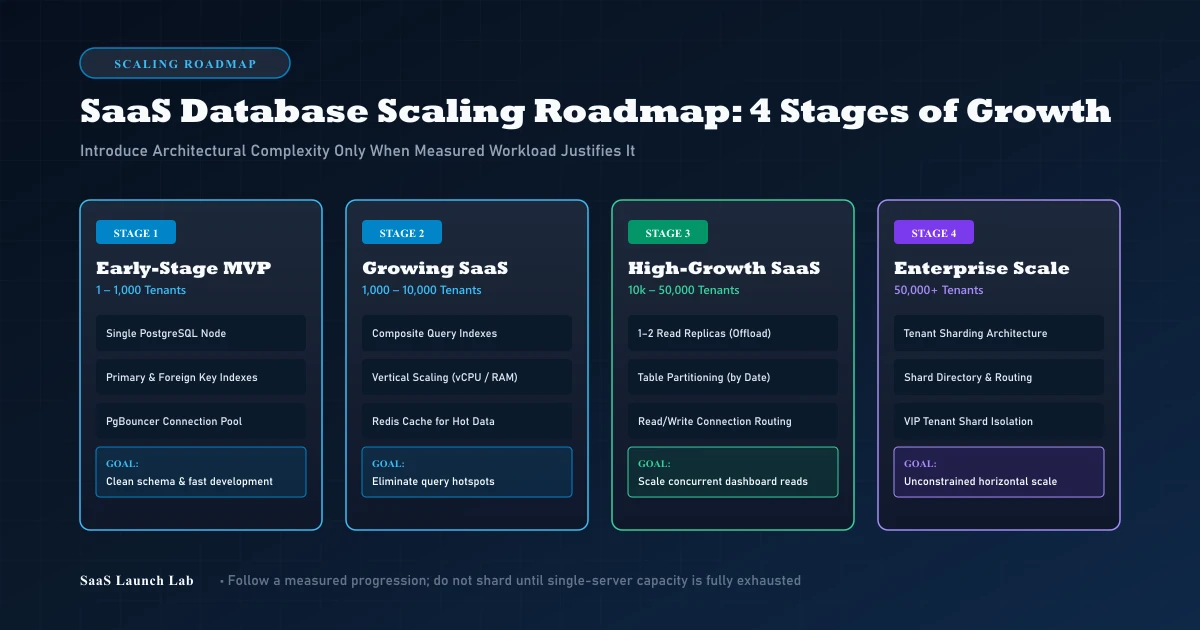
Stage 1: Early-Stage SaaS (1–1,000 Tenants) Goal: Maximize product delivery speed while establishing clean database fundamentals. Architecture: Single managed PostgreSQL instance (e.g. AWS RDS db.t4g.medium or Supabase Pro). Actions: Establish primary and foreign keys. Add B-Tree indexes on `tenant_id` across all multi-tenant tables. Implement connection pooling (PgBouncer). * Configure automated daily backups and point-in-time recovery (PITR).
Stage 2: Growing SaaS (1,000–10,000 Tenants)
Goal: Eliminate slow query hotspots and handle traffic growth smoothly.
Architecture: Single vertically scaled PostgreSQL instance + Redis cache.
Actions:
Enable pg_stat_statements to track slow queries.
Create composite indexes tailored to user dashboards.
Cache hot tenant metadata in Redis.
* Scale vertically (upgrade to db.m6g.xlarge with provisioned GP3 IOPS).
Stage 3: High-Growth SaaS (10,000–50,000 Tenants)
Goal: Offload heavy reader concurrency and manage large table maintenance.
Architecture: Primary database + 1–2 Read Replicas + Native Table Partitioning.
Actions:
Deploy read replicas; route analytics, exports, and search queries to replicaPool.
Implement table range partitioning for audit logs and historical event tables.
Set up automated monitoring for replication lag and buffer cache hit rates.
Stage 4: Large-Scale SaaS (50,000+ Tenants) Goal: Provide unconstrained horizontal write scaling and enterprise isolation. Architecture: Multi-Cluster Sharded Database with Tenant Routing. Actions: Implement a Tenant Shard Directory router. Migrate high-volume enterprise accounts to dedicated database nodes. Automate cross-shard migrations and unified schema synchronization.
---
9. Seven Database Scaling Mistakes SaaS Engineering Teams Should Avoid
Mistake 1: Upgrading Hardware Before Tuning Queries Purchasing an 8x larger database server masks query inefficiencies for a few months, but unindexed queries will soon overwhelm the new hardware as data volume increases. Always inspect execution plans first.
Mistake 2: Over-Indexing Write-Heavy Tables Adding an index for every column queried in your admin panel slows down transactional writes and inflates memory usage. Design composite indexes around real query patterns.
Mistake 3: Routing Immediate Read-After-Write to Replicas Sending user profile updates or checkout confirmations to an asynchronous read replica causes baffling "missing record" bugs due to replication lag. Keep mutation-adjacent reads on the primary.
Mistake 4: Sharding Too Early Sharding before exhausting query tuning, vertical scaling, and read replicas wastes hundreds of engineering hours on distributed infrastructure when a well-tuned single instance could have handled the workload.
Mistake 5: Neglecting Connection Pooling Spinning up hundreds of serverless containers that connect directly to PostgreSQL exhausts database process limits. Always deploy PgBouncer or an equivalent connection proxy.
Mistake 6: Ignoring Multi-Tenant Noisy Neighbors
Tracking average database CPU usage hides the fact that one runaway customer query is degrading performance for the other 999 tenants. Monitor query execution grouped by tenant_id.
Mistake 7: Confusing High Availability with Read Scaling A standby failover instance configured for multi-AZ high availability does not serve read traffic. You need dedicated read replicas to offload read queries.
---
10. Database Scaling Decision Checklist
Before making architectural changes to your database, verify each item on this checklist:
1. Bottleneck Diagnostics
[ ] Have you identified the top 5 slowest queries using `pg_stat_statements`?
[ ] Have you examined query plans using EXPLAIN (ANALYZE, BUFFERS)?
[ ] Have you verified that table statistics are current via `ANALYZE`?
[ ] Is the primary bottleneck CPU, Memory, Disk IOPS, or Connection limits?
2. Query & Index Tuning
[ ] Have all sequential scans on multi-tenant tables been addressed with indexes?
[ ] Are composite indexes structured with equality columns first and sort columns last?
[ ] Have unused indexes been audited and removed using `pg_stat_user_indexes`?
[ ] Are list queries properly paginated with LIMIT and cursor-based pagination?
3. Read Workload Offloading [ ] Does read traffic constitute more than 75% of total database operations? [ ] Can your reporting queries tolerate 50–150ms of asynchronous replication delay? [ ] Has your application separated connection pools for writes and reads? [ ] Is replication lag monitored with alerting thresholds?
4. Horizontal Sharding Evaluation
[ ] Has the database reached physical single-instance write throughput limits?
[ ] Can your data model be partitioned cleanly around a single tenant_id key?
[ ] Does the engineering team have automated procedures for cross-shard schema migrations?
[ ] Have you evaluated native PostgreSQL table partitioning before full sharding?
---
11. Frequently Asked Questions
What is database scaling in SaaS? Database scaling is the process of expanding a database system's capacity to handle growing query workloads, data storage, and concurrent user traffic. It encompasses query optimization, index tuning, connection pooling, vertical hardware upgrades, read replicas, table partitioning, and horizontal sharding.
What is the difference between vertical and horizontal database scaling? Vertical scaling increases the compute, memory, or storage resources of an existing database instance (such as upgrading from 4 vCPUs to 16 vCPUs). Horizontal scaling distributes workloads across multiple database instances or nodes, using techniques like read replicas for read traffic and sharding for data and write operations.
When should a SaaS application add database indexes?
Add database indexes when query analysis reveals sequential scans on large tables or when frequently executed queries spend significant time sorting or filtering records. Always evaluate query plans with EXPLAIN (ANALYZE, BUFFERS) to design indexes matching real query parameters.
Do read replicas improve database write performance?
Not directly. Read replicas serve read-only SELECT queries, meaning all INSERT, UPDATE, and DELETE mutations must still be processed by the primary database. However, by offloading heavy read traffic from the primary, replicas free up CPU and I/O resources for write processing.
What is replication lag in a database? Replication lag is the delay between when a write transaction commits on the primary database and when that change is replicated and visible on a read replica. Applications must account for this delay by routing read-after-write operations to the primary.
When should a SaaS application use database sharding? A SaaS application should consider sharding only when write throughput or storage volume exceeds the practical capacity of top-tier single database instances, and after query optimization, vertical scaling, and read replicas have been fully exhausted.
Is database partitioning better than sharding? Neither is universally better. Table partitioning organizes massive tables into manageable chunks inside a single database server, improving query pruning and maintenance. Sharding distributes data across separate database servers to scale write throughput and overall storage capacity.
Can PostgreSQL scale for a growing SaaS application? Yes. PostgreSQL is one of the most scalable relational databases available, supporting advanced B-tree and GIN indexes, declarative table partitioning, streaming replication, and distributed multi-tenant architectures powering companies with millions of users.
Does every multi-tenant SaaS need database sharding? No. The vast majority of multi-tenant SaaS applications can easily operate on a single well-indexed PostgreSQL instance with read replicas and connection pooling, scaling to tens of thousands of active tenants before sharding is required.
How do you know when your database needs scaling? Look for sustained performance degradation, such as p95 query latency exceeding 100ms, primary CPU usage remaining above 70% during normal hours, connection pool exhaustion, or disk IOPS reaching provisioned hardware limits.
---
Conclusion: Scale Your Database Based on Evidence, Not Assumptions
Database scaling is not about implementing the most complex distributed architecture as early as possible.
It is about diagnosing the exact bottleneck limiting your application and implementing the simplest reliable solution that eliminates it.
For early-stage and growing SaaS companies, proper composite indexing, query optimization, and connection pooling solve the vast majority of performance issues without adding infrastructure overhead.
When read traffic becomes the primary bottleneck, read replicas distribute the query load efficiently. When write throughput or storage volume finally exceeds single-server capacity, partitioning and tenant-based sharding provide unconstrained horizontal growth.
Measure first. Optimize queries continuously. Scale your infrastructure when verified workload data demands it.
To continue optimizing your engineering foundation, explore our guides to SaaS database design fundamentals, multi-tenant database architecture, and SaaS infrastructure costs.