Launching a Software-as-a-Service (SaaS) product is only the beginning of its infrastructure expenses.
Your application needs servers to process requests, databases to store customer information, storage for uploaded files, network bandwidth to deliver data, and monitoring systems to maintain reliability. These services create recurring infrastructure expenses that continue month after month once your software is live.
A SaaS product with 100 customers might operate comfortably on a relatively small infrastructure budget—often under $100 per month. However, as customer acquisition accelerates, database activity multiplies, users upload larger files, and application traffic spikes, cloud expenses can scale unpredictably.
The critical commercial question isn't simply how much a virtual server costs. It is: how much cloud infrastructure does your SaaS business require to serve each customer reliably, and how do you prevent hosting expenses from eroding your gross margins as you scale?
This guide provides an engineering-level breakdown of SaaS hosting costs, the core infrastructure components behind them, practical monthly cost calculations, scaling economics, and concrete strategies to optimize cloud spend without compromising application performance.
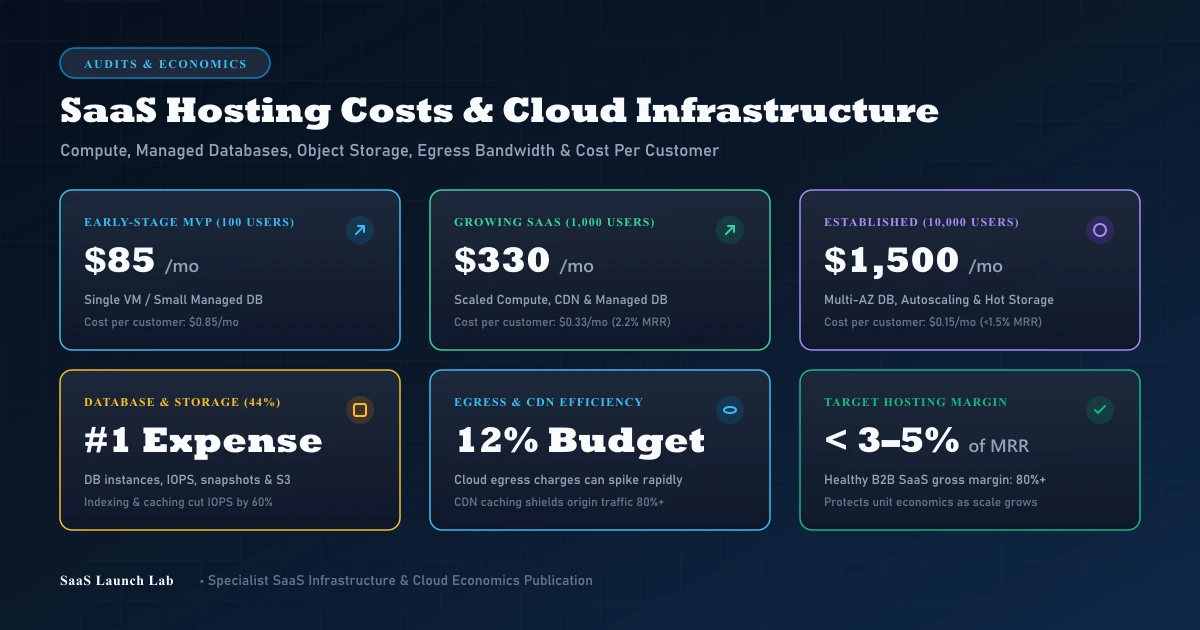
Figure: Architectural blueprint of modern SaaS cloud hosting expenses, early-stage vs scale budgets, and target unit economics.
---
Key Takeaways
- SaaS hosting costs encompass six distinct layers: Application compute, managed databases, object storage, egress bandwidth/CDN, automated backups, and supporting observability tools.
- There is no universal hosting fee: Monthly bills scale based on workload concurrency, database architecture, storage retention policies, geographical delivery, and high-availability guarantees.
- Cheapest advertised servers are rarely the most economical: A $10/month unmanaged server often costs far more in devops labor, maintenance hours, and downtime risk than a managed container environment.
- Database queries and data egress represent the largest hidden expenses: Inefficient full-table queries, missing indexes, uncompressed assets, and egress bandwidth create the fastest-growing budget leaks.
- Measure hosting costs per active customer: Evaluate cloud spending against Monthly Active Customers (MAC) and Monthly Recurring Revenue (MRR) rather than total registered signups.
- FinOps begins in development: Architectural decisions made during SaaS product development dictate whether your infrastructure operates at 85%+ gross margins or burns capital unnecessarily.
---
What Are SaaS Hosting Costs?
SaaS hosting costs are the recurring operational expenses incurred to run, secure, and maintain the internet-accessible infrastructure powering a Software-as-a-Service application.
Unlike legacy on-premise software installed directly on a client's local workstation, a modern SaaS application runs continuously in the cloud. End users interact with the platform through web browsers, mobile applications, or programmatic API gateways.
The cloud hosting environment must continuously support:
- Application execution and runtime processing: Serving web interfaces, executing business logic, and handling customer authentication.
- Database management: Executing queries, maintaining transactions, and isolating tenant records across multi-tenant architectures.
- File and object storage: Persisting customer documents, invoices, media assets, and exports.
- API integrations: Ingesting external webhooks and handling programmatic third-party requests.
- Background workers and queue workers: Processing asynchronous tasks like report generation, email scheduling, and automated workflows.
- Security, networking, and observability: Web Application Firewalls (WAF), SSL/TLS certificates, distributed error tracing, and centralized logging.
- Business continuity: Point-in-time database snapshots, cross-region replication, and automated disaster recovery.
Consider a multi-tenant project management SaaS. When a customer logs in, invites team members, uploads a specification document, queries past task activity, and triggers a PDF report export, multiple infrastructure layers are engaged simultaneously.
Each of these operations consumes discrete cloud resources: CPU cycles, database I/O operations per second (IOPS), memory allocation, network transfer bytes, and block storage. Understanding each discrete component is vital before modeling your monthly infrastructure budget.
---
The Main Components of SaaS Infrastructure Costs
A production SaaS application rarely runs on a single server bill. Instead, cloud hosting combines several interdependent services.
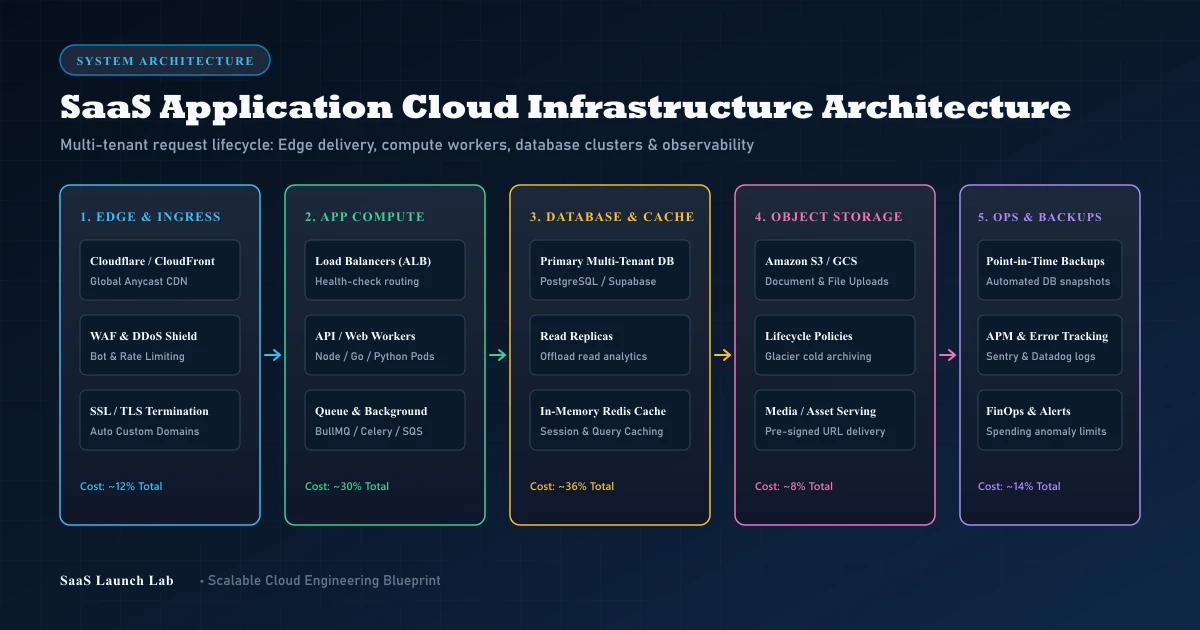
Figure: End-to-end multi-tenant cloud infrastructure request lifecycle from edge security to persistent data and automated backup tiers.
A. Application Servers and Compute
Application compute powers your backend code and handles incoming HTTP and WebSocket connections. In modern architectures, compute encompasses:
- User authentication, session management, and authorization checks.
- API endpoints and RESTful/GraphQL request processing.
- Business domain logic and transactional validations.
- Background asynchronous queue execution (e.g., Celery, BullMQ, Sidekiq).
Compute capacity is billed based on instance types, vCPU cores, allocated RAM, execution time, and deployment regions. As discussed in Google Cloud Compute Engine Pricing, compute expenses scale with continuous uptime or dynamic container autoscaling.
Early-stage applications often start with a single virtual machine or a containerized platform. As traffic grows, horizontal scaling introduces multiple load-balanced instances to maintain concurrency without latency degradation.
Optimization opportunities: - Right-size vCPU and RAM based on 95th-percentile utilization rather than theoretical peaks. - Terminate abandoned staging or development instances when outside working hours. - Deploy horizontal pod autoscalers (HPA) to scale down compute during low-traffic overnight windows. - Decouple compute-heavy jobs (e.g., video transcribing, PDF rendering) into dedicated asynchronous workers.
B. Database Hosting
The database is consistently the single most critical—and often most expensive—component of SaaS infrastructure. It houses your core customer data:
- User profiles, roles, and tenant permissions.
- Subscription billing records and audit trails.
- Core business records, relational tables, and activity feeds.
- Cache layers and ephemeral key-value states.
Database expenses depend on provisioned storage, provisioned IOPS, memory size, clustering, read-replica configurations, and automated backup retention. Whether using PostgreSQL, MySQL, or distributed engines, database performance directly dictates customer perceived latency.
A frequent architectural misstep is sizing databases strictly for storage volume while neglecting memory and indexing. As explained in our guide to SaaS database design, unindexed tables force full-table sequential scans that exhaust CPU and memory buffers, forcing teams into expensive and premature hardware upgrades.
Optimization opportunities:
- Create composite indexes on high-frequency filtering fields (tenant_id, created_at, status).
- Use connection poolers (e.g., PgBouncer) to prevent database thread starvation.
- Offload heavy read-only reporting and search queries to read replicas.
- Implement an in-memory caching tier (e.g., Redis) to serve repeated queries without hitting disk.
- Archive historic transactional logs into lower-cost cold storage.
C. File and Object Storage
Modern SaaS applications frequently process file attachments, user avatar graphics, PDF invoices, CSV data exports, and audit backups. Storing these assets directly on application server disks is an anti-pattern that inhibits horizontal scaling and risks data loss.
Production architectures use distributed object storage such as Amazon S3 or Google Cloud Storage. Object storage costs are governed by:
- Cumulative data volume stored (measured in gigabytes or terabytes).
- Read/write request operations (
GET,PUT,LISTrequests). - Data retrieval frequencies and lifecycle transitions.
- Geographic replication (single-region vs. multi-region redundancy).
Without automated data lifecycle policies, SaaS storage costs increase linearly every month as customers upload files that are never deleted.
Optimization opportunities: - Automatically compress user images (converting to modern formats like WebP) before saving. - Enforce strict client-side file upload limits. - Establish object lifecycle policies to automatically transition files older than 90 days to Infrequent Access (IA) or Glacier tiers. - Purge temporary export files and staging uploads after 24 hours.
D. Bandwidth and Data Transfer
Cloud network egress fees represent one of the most frequently underestimated line items on a SaaS cloud invoice. While inbound data transfer into cloud providers is typically free, outbound data transfer (egress) delivered to customers over the public internet carries metered charges.
Bandwidth consumption spikes during:
- Rich web dashboard page loads and media asset delivery.
- Customer exports of large CSV, Excel, or PDF reports.
- Large JSON/GraphQL payloads delivered across high-frequency API polling.
- Inter-region data replication between distributed server clusters.
For media-heavy platforms or API-first SaaS products handling millions of requests daily, outbound egress can account for 15% to 25% of total infrastructure expenses.
Optimization opportunities:
- Route public web traffic through a Content Delivery Network (CDN) like Cloudflare or CloudFront to cache static assets and API responses at the global edge.
- Enable Brotli or Gzip compression across all HTTP API responses.
- Implement pagination (limit and cursor) on API endpoints to prevent accidental multi-megabyte payloads.
- Serve uploaded assets directly from object storage via pre-signed URLs rather than proxying bytes through application servers.
E. Backups and Disaster Recovery
Protecting customer data is a foundational trust and compliance obligation. A robust backup policy protects against hardware failures, accidental database corruptions, and security breaches.
SaaS backup expenses depend on backup snapshot frequency, total retention lifespan, cross-region replication, and storage class. A mature backup strategy is governed by two industry metrics:
- Recovery Point Objective (RPO): The maximum age of files or transactions your business can tolerate losing when an outage occurs (measured in hours or minutes).
- Recovery Time Objective (RTO): The maximum acceptable duration of application downtime required to restore services following a disaster.
A fintech SaaS facilitating payments requires continuous write-ahead log (WAL) archiving with an RPO of seconds. Conversely, an internal administrative tool may comfortably operate on daily snapshots. Cost-cutting should never involve eliminating mission-critical database recovery backups.
F. Monitoring, Logging, and Security
Maintaining high availability and meeting enterprise Service Level Agreements (SLAs) requires proactive observability and defense-in-depth infrastructure:
- Application Performance Monitoring (APM): Distributed tracing tools like Datadog, New Relic, or Sentry.
- Centralized Log Ingestion: Storing system events, access logs, and error stacks (e.g., Elasticsearch, CloudWatch, Better Stack).
- Security & Network Firewalls: Web Application Firewalls (WAF), DDoS protection, and SSL/TLS certificate automation.
- Uptime & Synthetic Monitoring: Automated health checks that alert engineers within seconds of downtime.
A common driver of runaway cloud spend is unrestricted debug log ingestion. Emitting verbose debug logs on every high-traffic production API call can generate hundreds of gigabytes of ingested logs daily, leading to surprise observability invoices.
Optimization opportunities:
- Set production log levels to WARN and ERROR, reserving DEBUG for staging environments.
- Establish strict log retention policies (e.g., 14 to 30 days of hot storage, with cold archiving for compliance).
- Configure budget threshold alerts at 50%, 80%, and 100% of your expected monthly cloud spend.
---
How Much Does SaaS Hosting Cost Per Month?
Because hosting expenses reflect application architecture, concurrency, and data throughput, there is no single universal price. An early-stage CRUD application with modest traffic has vastly different operational demands than an established multi-tenant enterprise system.
The following scenarios illustrate typical monthly cloud hosting budgets across three representative growth stages.
Example 1: Early-Stage SaaS
Profile: 100 registered customers, low concurrency, single small database, lightweight file storage.
| Infrastructure Component | Monthly Estimate |
|---|---|
| Application compute (Single small VM / Container) | $25 |
| Managed database (Small PostgreSQL instance) | $30 |
| File and object storage (Basic S3 bucket) | $5 |
| Bandwidth and CDN (Standard egress) | $10 |
| Automated database backups | $5 |
| Monitoring, error tracking, and logging | $10 |
| Total Monthly Hosting Cost | $85 |
At this stage, spending under $100 per month is typical. The architecture prioritizes simplicity, allowing founders to validate product-market fit before investing in distributed clustering.
Example 2: Growing SaaS Application
Profile: 1,000 active customers, regular concurrent usage, dedicated managed database, CDN integration, and structured APM.
| Infrastructure Component | Monthly Estimate |
|---|---|
| Application compute (Autoscaled cluster / Multiple pods) | $100 |
| Managed database (Higher RAM, provisioned IOPS, read caching) | $120 |
| File and object storage (Active document uploads) | $25 |
| Bandwidth and CDN (Edge cached traffic and API delivery) | $40 |
| Backups and disaster recovery (Point-in-time recovery) | $15 |
| Monitoring, logging, and security (Sentry, WAF, uptime checks) | $30 |
| Total Monthly Hosting Cost | $330 |
At 1,000 customers, database IOPS and compute availability require dedicated sizing. A monthly hosting budget of $300 to $400 provides high reliability while maintaining outstanding unit economics.
Example 3: Established SaaS Application
Profile: 10,000 active customers, high concurrency, multi-AZ database clustering, read replicas, terabytes of storage, and 24/7 observability.
| Infrastructure Component | Monthly Estimate |
|---|---|
| Application compute (High-availability Kubernetes / VM cluster) | $450 |
| Managed database (Multi-AZ deployment with dedicated read replicas) | $500 |
| File and object storage (Multi-TB storage with lifecycle tiering) | $150 |
| Bandwidth and CDN (Heavy API egress and asset streaming) | $200 |
| Backups and disaster recovery (Cross-region snapshots) | $75 |
| Monitoring, logging, and enterprise security (Enterprise APM & WAF) | $125 |
| Total Monthly Hosting Cost | $1,500 |
At 10,000 customers, infrastructure is engineered for redundancy and fault tolerance. Notice that while customer volume expanded 100x from the MVP stage, hosting costs only increased 17x—demonstrating how scalable software architectures achieve compounding economies of scale.
How SaaS Infrastructure Expenses Are Distributed
Across typical growing and established SaaS applications, monthly cloud budgets generally fall into the following allocation percentages:
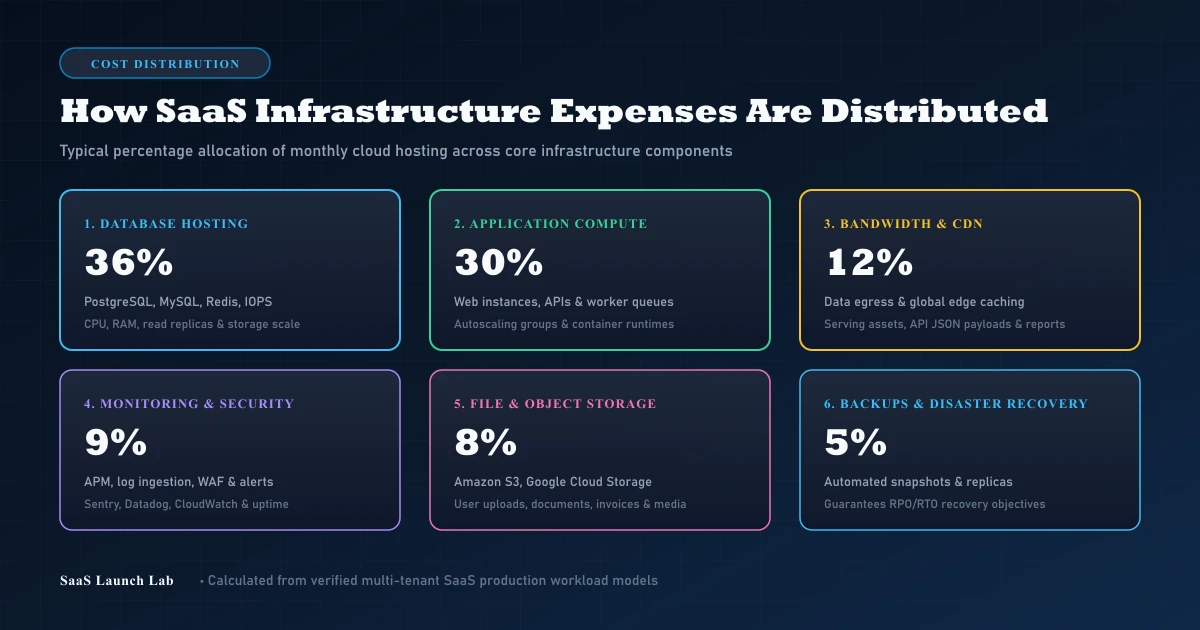
Figure: Percentage distribution of monthly cloud spending across production SaaS infrastructure layers.
| Cost Category | Early-Stage Share | Growing SaaS Share | Primary Cost Drivers |
|---|---|---|---|
| Database Hosting | 35% | 36% | CPU, memory buffer pools, IOPS, read replicas |
| Application Compute | 29% | 30% | vCPU instance runtime, worker nodes, autoscaling |
| Bandwidth & CDN | 12% | 12% | Outbound internet egress, global edge caching |
| Supporting & Observability | 12% | 9% | APM tracing, centralized log retention, WAF |
| File & Object Storage | 6% | 8% | Stored GBs, PUT/GET request volumes, replication |
| Backups & Recovery | 6% | 5% | Snapshot storage, retention periods, point-in-time WAL |
Note: These proportions represent illustrative planning scenarios from production SaaS benchmarks, not universal cloud quotas. Regional pricing and workload variations apply.
---
Calculate Your SaaS Hosting Cost Per Customer
Evaluating your cloud bill solely as a raw dollar figure obscures whether your infrastructure is economically healthy. The true operational test of infrastructure efficiency is your Hosting Cost Per Active Customer.
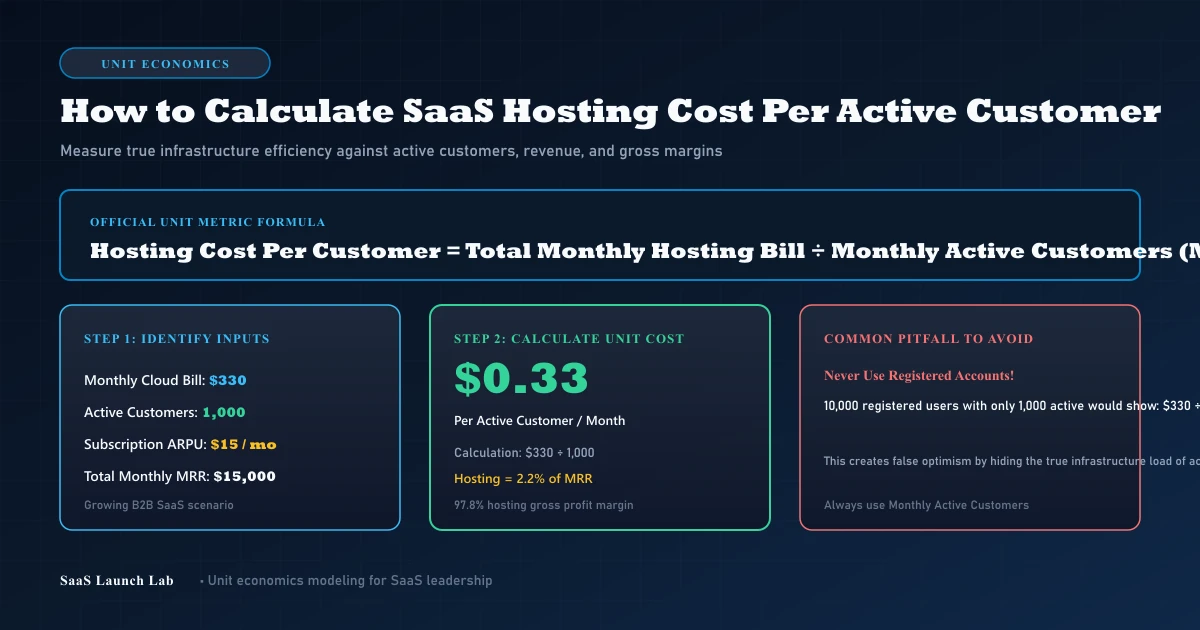
Figure: Unit economic formula and worked benchmark for calculating infrastructure spend per monthly active customer (MAC).
Hosting Cost Per Active Customer Formula
Hosting Cost Per Active Customer = Total Monthly Hosting Cost ÷ Monthly Active Customers (MAC)Applying this formula to our growing SaaS scenario:
- Total monthly hosting spend: $330
- Monthly active customers: 1,000
- Calculation:
$330 ÷ 1,000 = $0.33
Your infrastructure cost to support one active customer is $0.33 per month.
Now, compare this unit cost against your SaaS pricing models. If your platform charges a standard subscription price of $15 per customer per month:
| Metric | Amount | Business Interpretation |
|---|---|---|
| Monthly Recurring Revenue (MRR) | $15,000 | 1,000 customers × $15/month |
| Monthly Cloud Hosting Bill | $330 | Full infrastructure spend |
| Hosting Cost Per Active Customer | $0.33 | Direct unit delivery cost |
| Hosting as a Percentage of Revenue | 2.2% | 97.8% hosting gross profit margin |
While hosting does not constitute your complete Cost of Goods Sold (COGS)—which also incorporates customer support and merchant processing fees—maintaining hosting costs under 3% to 5% of monthly revenue is a hallmark of world-class SaaS unit economics.
An Important Distinction: Registered Users vs Active Users
Never divide your monthly hosting bill by total registered user accounts.
A SaaS platform may accumulate 10,000 registered accounts over two years, but only 1,000 customers may actively log in and query the database during a given month. Dividing $330 by 10,000 produces an artificially deflated unit cost of $0.033, masking the true operational load generated by active users.
Depending on your product model, you can also benchmark unit costs across other activity metrics:
- Cost per active organization: Ideal for B2B multi-tenant enterprise software.
- Cost per API transaction: Standard for headless developer platforms and data APIs.
- Cost per gigabyte stored: Essential for document management and cloud backup services.
- Cost per AI workflow executed: Vital when tracking LLM tokens and inference workloads (see our breakdown on the cost of adding AI to a SaaS).
Interactive SaaS Hosting & Infrastructure Cost Calculator
Use our interactive calculator below to model your SaaS hosting budget, evaluate cost per active customer, and measure your hosting gross margin against industry benchmarks:
SaaS Hosting & Cloud Infrastructure Cost Calculator
Simulate monthly infrastructure expenses, compute cost per customer, and evaluate hosting gross margins.
Your projected hosting leaves a high 97.8% infrastructure gross profit margin.
---
Why Do SaaS Hosting Costs Increase as Your Product Grows?
A common misconception among early-stage founders is assuming cloud bills scale in lockstep with user numbers. In reality, poorly optimized applications often experience non-linear cost spikes. Understanding these six growth drivers enables you to scale sustainably.
1. More Concurrent Users
As your customer base expands, simultaneous requests increase during peak business hours. To maintain low API latency and prevent request timeouts, your load balancers must distribute traffic across additional application compute instances or container pods.
2. Database Growth
More users generate more records, relational joins, table indexes, and continuous writes. As table sizes cross millions of rows, unindexed queries that previously executed in 15 milliseconds can suddenly take 3,000 milliseconds, pegging database CPU at 100% and forcing emergency instance upgrades.
3. Increased File Storage
SaaS customers continuously generate document uploads, exports, invoices, and profile assets. Unless automated storage lifecycle rules and retention boundaries are enforced, cumulative object storage volumes expand relentlessly every month.
4. Higher Bandwidth Consumption
Higher user engagement translates directly to increased data transfer. Rich data dashboards, file downloads, and uncompressed API payloads consume substantial network egress across global regions.
5. Background Processing
Advanced SaaS capabilities—such as automated email drip sequences, PDF invoice generation, web scraping, data synchronization, and nightly reporting—demand dedicated asynchronous queue workers. As user activity compounds, background worker capacity must scale accordingly.
6. Reliability and Availability Requirements
As customer dependence on your product deepens, downtime becomes unacceptable. Scaling into enterprise tiers requires:
- Multi-availability-zone (Multi-AZ) database replication.
- Redundant load-balanced server fleets.
- Dedicated staging and testing environments.
- Comprehensive security WAF rules and continuous compliance auditing.
While these architectural upgrades increase your hosting budget, they dramatically de-risk operational failure and protect customer retention (see our analysis on customer lifetime value).
---
How to Reduce SaaS Hosting Costs Without Hurting Performance
Reducing cloud expenses does not require degrading application speed or reliability. The goal of cloud financial engineering—frequently formalized as FinOps—is eliminating resource waste and improving architectural efficiency.
Strategy 1: Right-Size Your Infrastructure
Avoid provisioning hardware based on hypothetical future traffic spikes. Many startups over-provision 16-core database instances that idle at 4% CPU utilization 98% of the day.
Analyze cloud telemetry metrics over a 30-day window. If memory and CPU utilization consistently sit below 25%, safely downsize instance types. Conversely, ensure resources can gracefully handle expected traffic peaks before downsizing.
Strategy 2: Optimize Database Queries
Database optimization delivers the highest ROI of any cloud cost-reduction initiative. A single optimized query can drop database CPU utilization from 90% to 15%, eliminating the need for a $400/month database tier upgrade.
- Audit slow query logs weekly to identify queries with execution times exceeding 200 milliseconds.
- Add targeted indexes on foreign keys and compound filtering columns.
- Implement strict cursor-based pagination to restrict unbounded query result sets.
- Deploy connection pooling (e.g., PgBouncer) to reduce database process memory overhead.
Strategy 3: Implement Caching
Without caching, your application repeatedly computes identical database queries for static dashboard data and configuration settings.
Deploy an in-memory cache like Redis or Memcached to store: - User session tokens and authorization permissions. - Static application metadata and system settings. - Frequently queried dashboard summary aggregations.
Serving high-frequency requests from RAM rather than querying PostgreSQL disk buffers slashes database load and dramatically reduces compute response times.
Strategy 4: Use a CDN
A global Content Delivery Network (CDN) caches static assets (JavaScript, CSS, fonts, images) and static API responses across hundreds of edge locations worldwide.
Routing requests through an edge CDN: - Absorbs up to 80% of web traffic before it hits your origin servers. - Eliminates expensive origin egress fees. - Delivers sub-50ms asset load times to international customers.
Strategy 5: Automate Resource Scaling
SaaS traffic is rarely uniform. B2B software typically experiences heavy usage between 8:00 AM and 6:00 PM Monday through Friday, with minimal activity overnight and on weekends.
Configure autoscaling rules linked to CPU utilization or request latency. Automatically scale down redundant compute pods during off-peak hours to avoid paying for idle capacity when users are asleep.
Strategy 6: Monitor Storage and Log Retention
Unchecked log files and forgotten test database snapshots quietly inflate cloud bills:
- Restrict production log retention in tools like Datadog or CloudWatch to 14 or 30 days.
- Configure S3 Lifecycle rules to transition objects older than 90 days to low-cost archival storage classes.
- Automatically delete staging and sandbox databases after testing cycles conclude.
Strategy 7: Use Cloud Pricing Discounts Carefully
All major cloud providers (AWS, Google Cloud, Microsoft Azure) offer significant pricing discounts in exchange for long-term usage commitments:
- Reserved Instances (RI) / Committed Use Discounts (CUD): Yield 30% to 60% discounts on predictable, steady-state baseline compute and database instances committed over 1-year or 3-year periods.
- Spot / Preemptible Instances: Offer up to 70% savings for fault-tolerant background queue processing and batch workloads.
Caution: Never commit to multi-year capacity contracts during your first six months of operation. Understand your baseline traffic patterns first before committing to long-term commitments.
---
Cloud Hosting vs Managed Hosting vs Serverless: Which Is Better for SaaS?
Selecting your hosting architecture is not merely about finding the lowest advertised price. It is about balancing infrastructure control, engineering maintenance overhead, scalability, and long-term cost predictability.
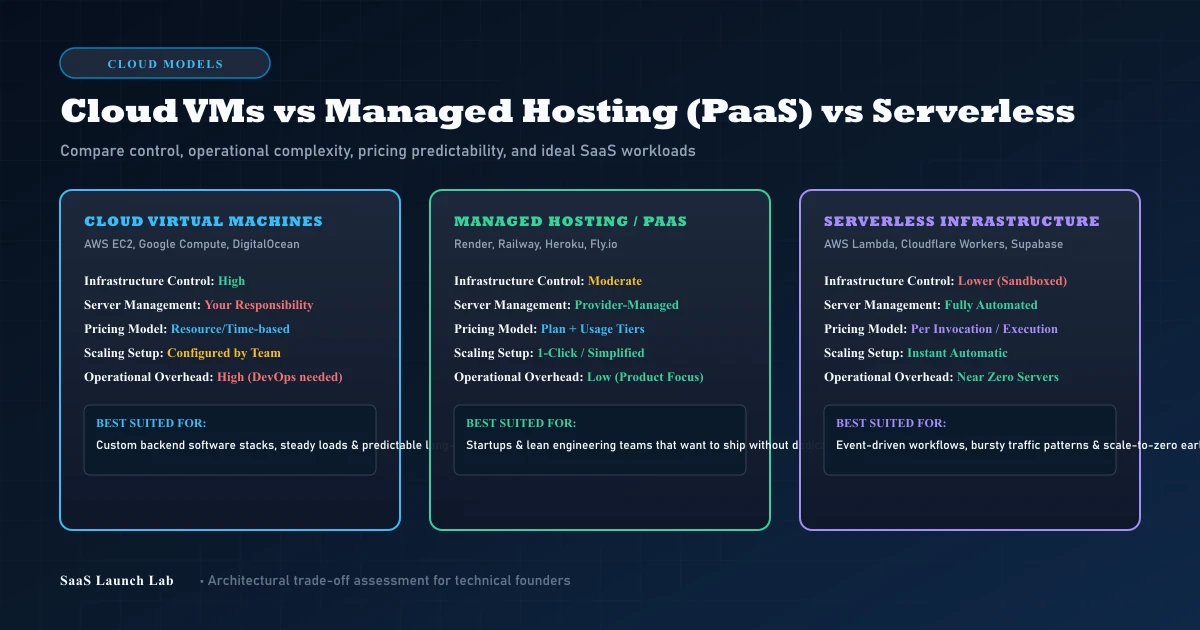
Figure: Comprehensive comparison of cloud virtual machines, managed PaaS, and serverless architectures for SaaS applications.
| Decision Factor | Cloud Virtual Machines | Managed Hosting / PaaS | Serverless Infrastructure |
|---|---|---|---|
| Representative Providers | AWS EC2, GCP Compute Engine, DigitalOcean | Render, Railway, Heroku, Fly.io | AWS Lambda, Cloudflare Workers, Supabase |
| Infrastructure Control | High (Root OS, custom kernel & networking) | Moderate (Buildpacks, container runtime) | Lower (Sandboxed execution context) |
| Server Administration | Full engineering responsibility | Managed by provider | Zero server maintenance |
| Pricing Predictability | High (Fixed hourly/monthly instance rates) | Moderate (Tiered plans plus bandwidth) | Variable (Billed per invocation & duration) |
| Scaling Mechanism | Configured by team (Autoscaling groups) | 1-Click UI / Simplified metric rules | Instant automatic concurrency scaling |
| Maintenance Burden | High (OS patching, security updates, firewall) | Minimal (Focus on application code) | Minimal (Focus on function logic) |
| Ideal Workload Profile | Stable baseline loads, custom software stacks | Early MVPs, lean teams seeking rapid delivery | Event-driven jobs, bursty intermittent traffic |
Cloud Virtual Machines
Cloud virtual machines (such as AWS EC2 or DigitalOcean Droplets) offer granular control over operating systems, memory allocation, and networking topology. They are well-suited for established SaaS applications with predictable continuous workloads and in-house devops expertise. However, your engineering team remains entirely responsible for OS security patches, firewall configurations, and server provisioning.
Managed Hosting and Platform as a Service
Managed platforms (such as Render, Railway, or Heroku) abstract underlying server management. Developers connect their GitHub repositories, and the platform automates container builds, SSL certificates, database provisioning, and deployments.
For early-stage startups and lean teams building an MVP in 30 days, managed PaaS environments save thousands of dollars in senior devops engineering salaries, allowing founders to focus purely on shipping customer features.
Serverless Infrastructure
Serverless architectures execute code in ephemeral runtime containers triggered by incoming HTTP requests or asynchronous events (e.g., AWS Lambda, Cloudflare Workers). You pay strictly for execution milliseconds and memory utilized.
Serverless can be exceptionally cost-effective for early products with variable or intermittent traffic. However, for continuous high-throughput applications, high invocation frequencies combined with API gateway charges can make serverless more expensive and less predictable than dedicated instances.
---
Hidden SaaS Infrastructure Costs Founders Should Not Ignore
When planning infrastructure budgets, founders frequently omit auxiliary operational expenses that sit outside core compute and database instances:
| Hidden Expense | Operational Impact | Budgeting Recommendation |
|---|---|---|
| Inter-Region Data Egress | Transferring data between cloud regions or availability zones incurs metered network fees. | Colocate databases, compute clusters, and storage buckets within the same cloud region. |
| Log Ingestion & APM | High-volume application traces and debug logging can generate surprise observability invoices. | Sample high-frequency events and enforce 14-day retention limits on production logs. |
| Development & Staging Fleets | Neglected staging servers, PR review instances, and test databases incur 24/7 billing. | Automate nightly shutdowns for development environments via cron schedules. |
| Transactional Email Delivery | Customer onboarding, password resets, and notifications rely on services like SendGrid or Postmark. | Budget based on active user notification volume (typically $10–$50/mo early on). |
| Third-Party API Dependencies | External APIs for address lookups, identity verification, or AI embeddings charge per request. | Implement aggressive response caching to prevent duplicate third-party API calls. |
| Commercial Support Plans | Enterprise-grade cloud support plans (AWS Business Support) add 3% to 10% to monthly cloud spend. | Defer premium support until required by enterprise customer security agreements. |
Infrastructure Complexity and Engineering Maintenance
The most significant hidden cost of infrastructure is never cloud computing itself—it is the engineering time required to maintain it.
A self-managed, bare-metal server cluster that saves $150 per month in hosting fees is financially disastrous if it demands 20 hours of senior developer maintenance every month. When evaluating infrastructure options, always incorporate the fully loaded cost of engineering hours into your total cost of ownership.
---
A Practical SaaS Hosting Cost Optimization Checklist
Use this structured monthly checklist to audit your cloud infrastructure, eliminate resource waste, and maintain healthy gross margins:
Infrastructure Review - [ ] Inspect CPU and memory utilization graphs across all production instances. - [ ] Identify and decommission idle, orphan, or oversized servers. - [ ] Verify that autoscaling policies scale down compute during off-peak night windows. - [ ] Confirm staging and development instances terminate automatically outside work hours.
Database Audit - [ ] Review slow query logs to identify queries exceeding 200ms latency. - [ ] Confirm appropriate composite indexes exist on high-frequency filtering fields. - [ ] Verify connection pooling is functioning properly to prevent thread exhaustion. - [ ] Review database storage growth rates and verify point-in-time recovery health.
Storage and Bandwidth Optimization - [ ] Verify object storage lifecycle policies automatically transition aged files to cold storage. - [ ] Audit outbound data transfer volume and inspect top egress endpoints. - [ ] Confirm static assets, web fonts, and public API responses are cached at the CDN edge. - [ ] Purge temporary export files, sandbox databases, and orphaned snapshots.
Monitoring and FinOps Governance - [ ] Reconcile monthly cloud invoices against your projected budget. - [ ] Set automated billing alerts at 50%, 80%, and 100% of expected monthly spend. - [ ] Calculate your Hosting Cost Per Active Customer and monitor trends. - [ ] Review hosting expenses as a percentage of Monthly Recurring Revenue (target: < 5%).
---
How to Build a SaaS Hosting Budget Before Launch
You do not need to wait until your application is live to establish a realistic cloud budget. Follow this six-step engineering framework to model infrastructure expenses before writing code.
Step 1: Estimate your expected usage
Document your projected baseline operational workload for the first 90 days post-launch: - Projected registered accounts and Monthly Active Customers (MAC). - Expected concurrent user sessions during peak hours. - Daily API request volumes and database write frequencies. - Estimated file upload volume per active account (in megabytes/gigabytes).
Step 2: Map your infrastructure
List the exact cloud service tiers required to deliver your application: - Application compute (web nodes, API pods, background workers). - Primary database and in-memory caching tier. - Distributed object storage buckets. - CDN edge caching and DNS routing. - Observability (APM, error logging, uptime checks).
Step 3: Estimate each component
Use official cloud pricing calculators to model your specific regional configurations: - AWS Pricing Calculator - Google Cloud Pricing Calculator - Microsoft Azure Pricing Calculator
Avoid relying on introductory promotional pricing or free-tier allowances that expire after your launch month.
Step 4: Create three scenarios
Model three distinct operating scenarios to understand your financial boundaries: 1. Launch Scenario: Baseline minimum workload (e.g., 50–100 initial pilot customers). 2. Growth Scenario: Expected 6-to-12-month customer adoption (e.g., 1,000 active accounts). 3. Peak / Stress Scenario: Rapid viral expansion (e.g., 5,000 active accounts with heavy data throughput).
Step 5: Add a contingency allowance
Always add a 15% to 25% financial contingency buffer to your initial infrastructure estimates. This planning cushion accounts for unoptimized early queries, initial indexing overhead, development trial testing, and unexpected bandwidth spikes.
Step 6: Review your estimates monthly
Compare actual monthly invoices against your projected estimates. When cloud bills deviate by more than 15% from your model, conduct an immediate architectural audit to identify whether the variance stems from healthy customer growth or architectural inefficiency.
---
Frequently Asked Questions
How much does it cost to host a SaaS application? For an early-stage MVP with 100 users, hosting typically costs between $50 and $100 per month using managed platforms or small virtual instances. A growing SaaS serving 1,000 active customers typically spends $300 to $500 monthly, while established platforms with 10,000+ users spend $1,500 to $3,500+ depending on database complexity, file storage, and redundancy requirements.
What is the cheapest way to host a SaaS application? The most economical approach is to match infrastructure to your application's actual operational workload. Managed platforms like Render or Railway, small virtual machines ($10–$25/mo on DigitalOcean), or serverless edge runtimes (Cloudflare Workers) provide cost-effective starting points. Always evaluate total cost of ownership, including the engineering hours required to maintain servers.
Does SaaS hosting cost increase with the number of users? Yes, but not at a 1:1 linear rate. A well-architected SaaS application benefits from economies of scale. While database operations, storage, and network bandwidth increase as user counts climb, efficient caching, database indexing, and autoscaling allow infrastructure costs per customer to decline substantially as scale increases.
What percentage of SaaS revenue should go toward hosting? For standard B2B SaaS companies, hosting expenses should ideally remain below 3% to 5% of Monthly Recurring Revenue (MRR). Maintaining hosting costs below 5% preserves an overall gross margin above 80%, providing healthy cash flow for sales, engineering development, and marketing.
Is AWS, Google Cloud, or Azure cheaper for SaaS? No single major provider is universally cheaper across all workloads. AWS offers unmatched service breadth, Google Cloud excels in container orchestration and data analytics pricing, and Microsoft Azure provides advantageous pricing for enterprise Windows/Active Directory environments. Compare exact regional instance types and egress fees using provider pricing calculators before committing.
Is serverless cheaper than traditional cloud hosting? Serverless can be cheaper for early applications with sporadic, unpredictable, or low traffic because you pay strictly for execution time with zero idle server expenses. However, for steady, continuous high-traffic workloads, dedicated virtual machines or container clusters often prove significantly more cost-effective and predictable.
How can I estimate hosting costs before launching my SaaS? Define your anticipated workload: monthly active customers, concurrent users, expected database transactions, file storage volume, and network data egress. Then use official cloud calculators (AWS, GCP, or Azure) to model launch, growth, and peak scenarios with a 15–25% contingency buffer.
What is the difference between SaaS hosting costs and SaaS development costs? SaaS development costs represent the initial capital investment required to design, architect, engineer, and test software prior to release (see SaaS development costs). SaaS hosting costs are recurring operational expenses required to keep the application running, secured, and accessible after deployment.
Should SaaS startups use managed databases? Yes. Managed databases (such as AWS RDS, Google Cloud SQL, or Supabase) automate routine patching, multi-AZ replication, failover orchestration, and point-in-time snapshots. The modest price premium over self-hosting is vastly outweighed by the savings in developer hours and reduced downtime risk.
What is FinOps in SaaS infrastructure management? FinOps (Cloud Financial Operations) is an operational framework that unites engineering, finance, and product teams to optimize cloud spending and ensure infrastructure investments directly support business value. It emphasizes unit cost visibility, continuous waste elimination, and data-driven infrastructure decisions.
---
Conclusion: Optimize Infrastructure for Sustainable SaaS Growth
SaaS hosting expenses are not merely a technical concern—they directly influence your operating margins, pricing models, capital runway, and enterprise valuation.
The winning strategy is never to pick the cheapest server available, nor is it to over-provision massive enterprise clusters before validating market demand.
Instead, build an infrastructure foundation that matches your current workload, benchmark your spending against Hosting Cost Per Active Customer, eliminate unnecessary database and bandwidth waste, and scale capacity as real customer traction warrants.
By coupling disciplined SaaS unit economics with modern, scalable multi-tenant SaaS architecture, you ensure your infrastructure supports profitable, sustainable growth from your first 100 users to 100,000 and beyond.
---
Recommended Further Reading
Explore related SaaS Launch Lab architectural and unit economic guides:
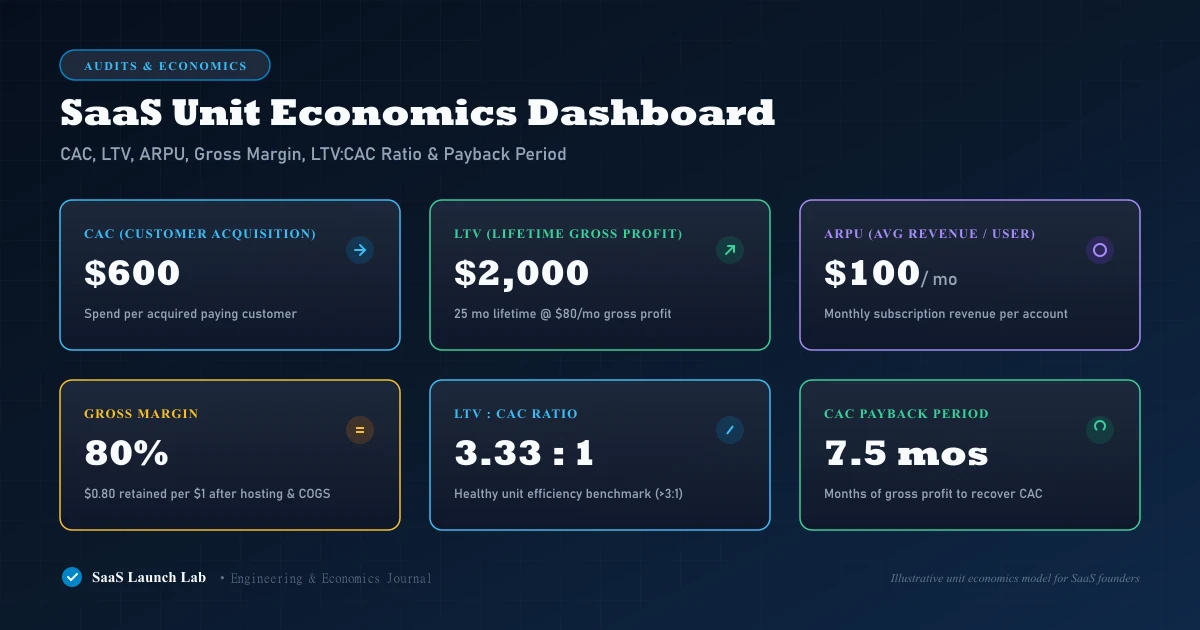
- [SaaS Unit Economics: Understanding CAC, LTV, ARPU, and Gross Margin](/blog/saas-unit-economics): Master the core financial benchmarks that govern sustainable SaaS growth.
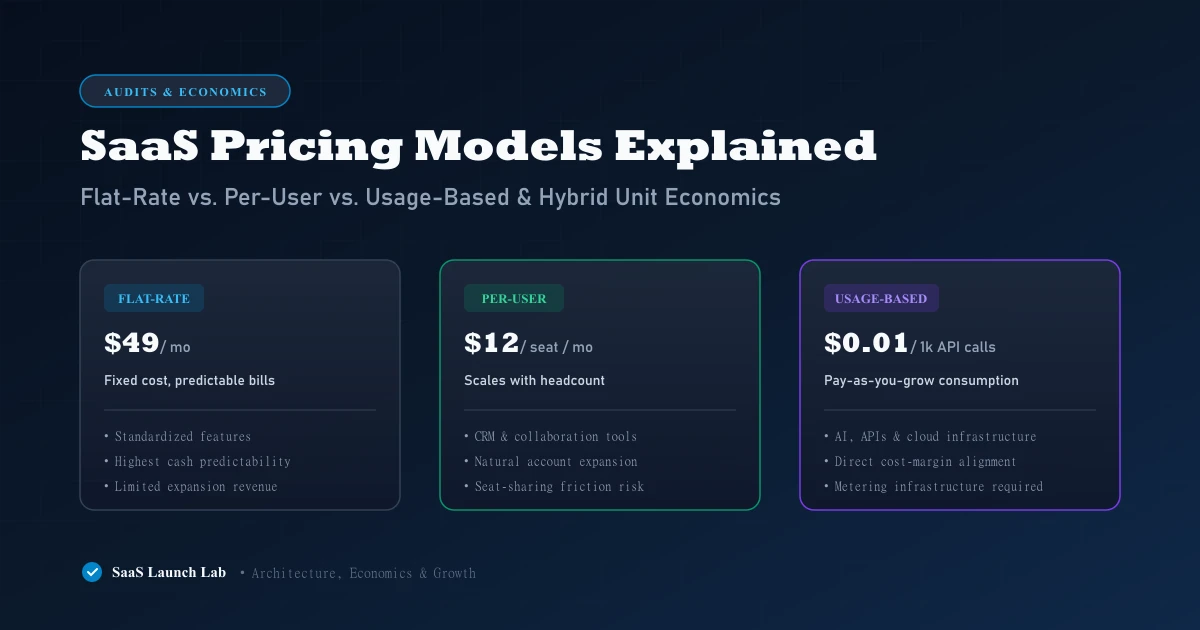
- [SaaS Pricing Models Explained: Flat-Rate vs Per-User vs Usage-Based](/blog/saas-pricing-models): Align your pricing structure with infrastructure consumption and customer value.
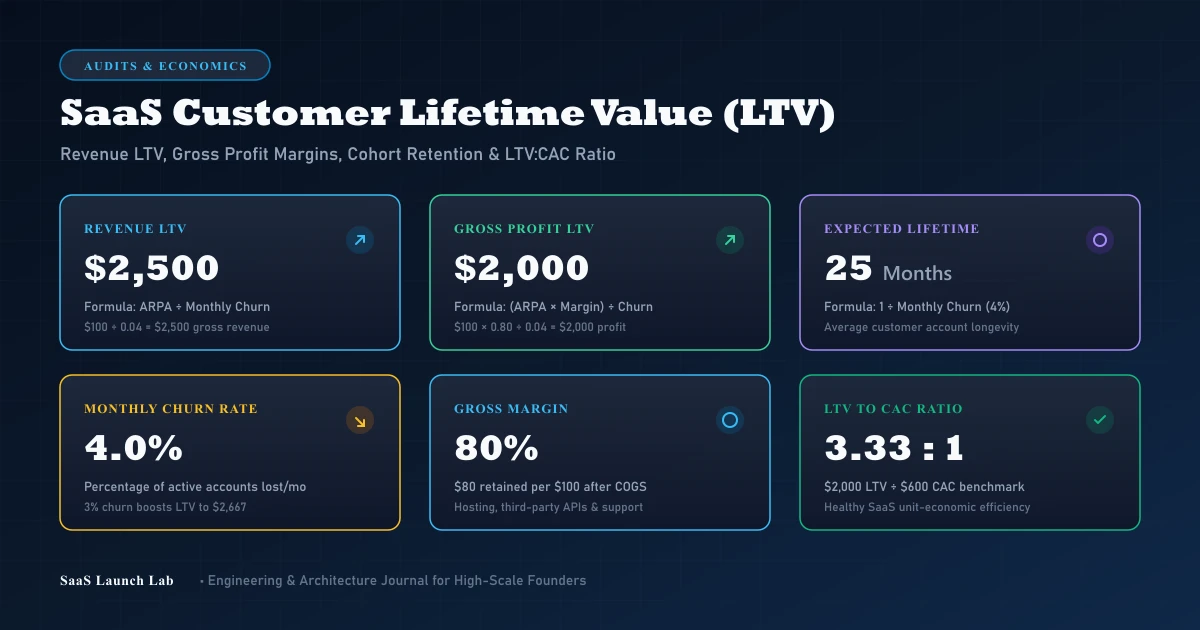
- [SaaS Customer Lifetime Value (LTV): Formula & Examples](/blog/saas-customer-lifetime-value): Learn how to accurately project customer longevity and gross profit margins.
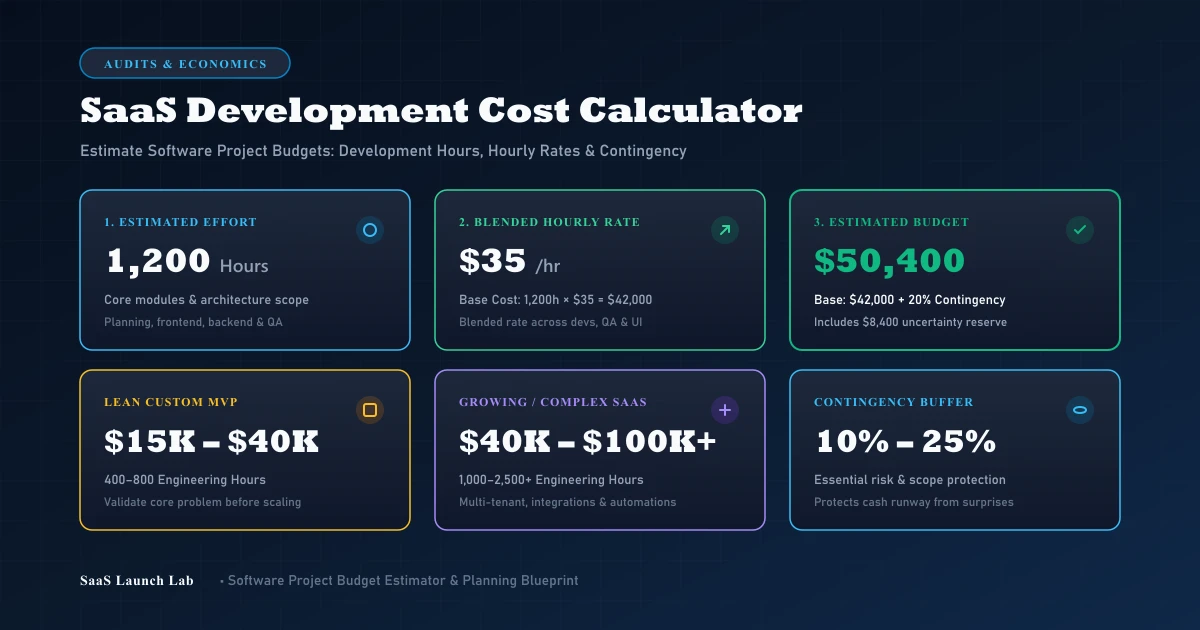
- [SaaS Development Costs: What Founders Should Budget Before Building](/blog/saas-development-cost): Understand the upfront investment required to engineer a production-ready SaaS product.
- [Multi-Tenant SaaS Architecture: How to Build for Multiple Customers](/blog/multi-tenant-saas-architecture): Architect resilient tenant isolation and scalable database models.
- [SaaS Database Design: Choosing the Right Architecture](/blog/saas-database-design): Prevent costly query bottlenecks and optimize database performance.
- [SaaS Audit Checklist Before Launch](/blog/saas-audit-checklist-before-launch): Verify security, performance, and infrastructure readiness before going live.
External Documentation & Frameworks: - Amazon S3 Pricing – AWS - Google Cloud Compute Engine Pricing Guide - Google Cloud Storage Pricing Documentation - FinOps Foundation Official Framework - What Is FinOps? Cloud Financial Operations – Google Cloud - Microsoft Azure FinOps Architecture Guide
Editorial Note: All numerical budgets and cost breakdowns presented in this guide are illustrative planning models based on standardized cloud provider rate structures. Verify regional cloud pricing using official cloud provider pricing calculators before finalizing production commitments.